

Your monitor should not dictate your posture. If you spend hours leaning down toward a screen, a simple elevation upgrade can change how your entire desk feels, from the angle of your neck to the amount of clear space in front of you.
The best monitor risers for home offices do more than lift a display. They create a stronger visual line, reduce desk clutter, and give a work setup the composed, intentional feel of a space built to perform. The right choice depends on your monitor, your desk depth, and whether you need clean storage or serious adjustability.
What Makes a Monitor Riser Worth Buying?
A monitor riser has one job at its core: place the center of your screen closer to eye level. For many people, that means raising the monitor by several inches. When the screen sits too low, your head naturally tips forward. Over a long workday, that small angle can contribute to neck and shoulder discomfort.
But height is only the starting point. A premium riser should feel secure under the full weight of your monitor, remain steady when you type or adjust the display, and complement the rest of your setup rather than looking like an afterthought. It should also leave your desk more useful than it was before.
The best designs balance four priorities: the right viewing height, dependable stability, practical desk organization, and a finish that belongs in a polished home office.
Start with your screen position
A good target is to position the top of your screen at or slightly below eye level. Your eyes should naturally fall around the upper third of the display without forcing you to lift your chin or look sharply downward. This is a guideline, not a rigid rule. If you wear progressive lenses, prefer a reclined chair position, or work with a very large monitor, a slightly lower screen may feel better.
Measure before you buy. Sit in your normal working posture, then measure the distance from your desktop to your preferred eye line. Subtract the height of your monitor's current stand. The result gives you a useful estimate of the riser height you need.
Best Monitor Risers for Home Offices: Choose by Setup
There is no single best riser for every desk. The best option is the one that solves the problem in front of you without creating another one. A compact laptop-and-monitor desk needs a different solution than a wide creative workstation with a 34-inch display.
Fixed-height risers for clean, minimal desks
A fixed-height riser is the refined choice when you already know your ideal screen position. Usually built from metal, wood, or a combination of both, it provides a stable platform with a simple visual footprint. It is especially effective for home offices where the monitor stays in one place and the desk is shared with a keyboard, notebook, or charging station.
Look for a broad base, non-slip contact points, and a stated weight capacity that comfortably exceeds your monitor's weight. The space beneath the platform is a quiet advantage. It can hold a keyboard when your workday ends, keep a dock out of sight, or create a dedicated home for small desk essentials.
The trade-off is obvious: fixed height does not adapt if you change chairs, add a thicker desk mat, or move to a different monitor. It is a strong long-term choice for a settled setup, not an experimental one.
Adjustable risers for flexible workstations
An adjustable monitor riser makes sense when more than one person uses the desk or when you are still refining your ergonomics. These designs may offer telescoping legs, stackable height sections, or a platform that raises in increments.
Flexibility is valuable, but it should not come at the cost of stability. Avoid lightweight designs that wobble when the monitor is touched. A riser that adjusts quickly but flexes under load will make a premium monitor feel less secure and can become distracting during video calls, design work, or fast-paced gaming.
Choose adjustment only when you will use it. If your height requirement is clear, a fixed riser often delivers a cleaner silhouette and a more planted feel.
Wide shelf risers for multi-device desks
Wide monitor shelves are built for people who work across more than one device. They can support an ultrawide display, a monitor paired with a laptop stand, or two compact screens, while leaving room underneath for a keyboard and accessories.
This format can make a shallow desk feel more organized because it creates a clear upper zone for screens and a lower zone for daily tools. It is also a natural fit for creatives who keep external drives, tablets, color references, or audio equipment within reach.
Check the usable width, not just the overall product width. Legs, brackets, and support frames can reduce the area where a monitor base can actually sit. You should also confirm that the riser's depth supports the entire footprint of the monitor stand. A platform that is too narrow can feel precarious, even if its listed weight capacity is high.
Storage risers for compact home offices
When your home office is a corner of the living room, a bedroom desk, or a small apartment workspace, a riser with integrated drawers can earn its place. It offers vertical lift while containing adapters, pens, cables, and the small items that create visual noise.
Storage is not automatically better. Bulky drawer units can push a monitor farther back or raise it beyond a comfortable viewing height. They can also look heavy on a narrow desk. Choose this format when the storage solves a real problem and when the overall dimensions still leave you enough working surface in front of the screen.
Clamp-mounted platforms for maximum desk space
Some monitor platforms attach to the edge of the desk rather than sitting on it. This approach clears the desktop beneath the display and gives a setup a more architectural, elevated appearance. It can be useful for compact desks where every inch matters.
Before choosing a clamp-mounted option, check the thickness and construction of your desktop. Glass, very thin tops, hollow-core furniture, and desks with an obstructed rear edge may not be suitable. Clamp systems also require careful installation. The payoff is a remarkably clean surface, but only when the desk can safely support it.
Material and Build Quality Change the Experience
A riser is a load-bearing piece of desk hardware. Material matters because it affects not only appearance but also rigidity, longevity, and how confident the setup feels every time you sit down.
Steel and aluminum designs often suit modern workspaces because they are slim, strong, and visually precise. Quality metal risers should have clean edges, durable finishes, and protective pads that prevent sliding or marking the desk. Solid wood brings warmth and can pair beautifully with a home setting, though it should be well finished and thick enough to resist flexing. Engineered wood and acrylic can be practical at lower price points, but inspect capacity, stability, and surface durability more closely.
Do not judge a riser by aesthetics alone. A beautiful platform that vibrates every time you type undermines its purpose. For larger monitors, especially curved or ultrawide models, prioritize a rigid frame and a generous safety margin in the weight rating.
Unsere Monitorhalterungen


Riser or Monitor Mount?
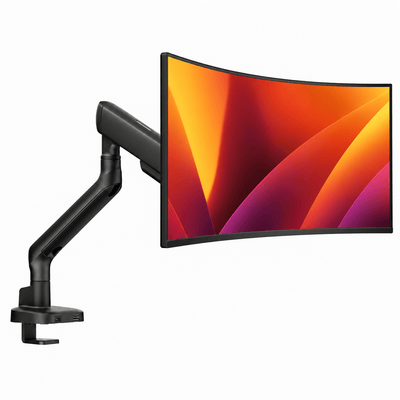
A monitor riser is not always the right answer. If you need precise height, tilt, swivel, rotation, or forward-and-back positioning, a monitor mount may deliver a better ergonomic result. A mount is particularly useful when your desk is shallow or your display needs to move between focused work, collaboration, and video calls.
A riser is the better fit when you want a fast, stable upgrade with no clamp hardware, no arm adjustment, and no change to your monitor's existing stand. It also brings a distinct design benefit: the shelf itself can organize your desk and give the setup more visual structure.
For hybrid workstations, the two can work together. A monitor mount can hold the screen in the ideal position while a low profile shelf organizes the space beneath it. The key is avoiding unnecessary height. Stacking a tall riser under a mounted monitor can quickly place the display too high.
Details to Check Before You Commit
Before adding a riser to your desk, confirm the monitor's weight and stand dimensions, then compare them with the product's usable surface and stated capacity. Leave room for a safety margin rather than buying to the exact limit.
Consider your desk depth next. You need enough space to keep the screen at a comfortable distance, typically about an arm's length away, while still having room for your keyboard and hands. A deep riser can be useful for a large monitor base, but it may crowd a compact desk.
Finally, look at the cable path. The cleanest home offices do not hide every cable through complicated systems. They simply create deliberate routes. A riser with open clearance below the platform can make it easier to guide cables toward a rear tray or a power source without leaving a tangle in plain view.
At Alberenz, ergonomic hardware is designed to make the desk feel more capable, not more complicated. That is the standard worth holding any riser to: it should improve the way you work while making your workspace look considered from every angle.
Choose the height that supports your body, the build that supports your monitor, and the form that supports the way you want to work. A better desk often starts with a few inches of elevation.




