

A single screen setup may look simple, but the height of your monitor largely determines how your body holds itself during a long workday. You have no other screens to look at now and then, so even a small height error has a direct effect on your posture and muscle tension.
Over time the body adapts to this error instead of correcting it. An ergonomic monitor setup for daily work therefore starts with a screen at the right height, so you can sit relaxed and upright. A properly adjusted monitor arm helps you keep it that way, even as your posture changes over the course of the day.
Why does monitor height matter so much with one screen?
Monitor height directly influences the position of your neck and the tension in your upper body during focused desk work. When the screen is too high or too low, your head adjusts without you noticing to keep your eyes on the screen. These small compensations require continuous muscle effort, even when you barely notice them. Over time this leads to stiffness that you do not immediately connect with the screen.
With one screen this effect is stronger, because your viewing angle never changes.
When the screen is at the right height, your head rests in balance over your spine without effort. You look at the screen naturally and do not need to tilt your neck. As a result, less tension builds up during long work sessions. You sit comfortably because your posture is right, not because you keep paying attention to it. A monitor arm makes it easier to keep this balance.
How does your body react to a screen that is too high or too low?
Your body reacts quickly when the screen is not at the right height, even when the difference is small. A screen that sits slightly too high makes you tilt your head back a little for hours at a time. A screen that sits too low makes your head move forward. These positions feel normal at first, but your muscles quietly have to compensate for them. Usually you only notice when discomfort develops.
Screen height is often overlooked because the chair and desk get more attention. The screen stays in the same place while your posture changes throughout the day. That is why discomfort sometimes persists even after you have adjusted everything else. When you set the screen at the right height, your body no longer has to compensate. A monitor arm lets you make this correction without effort.
How do you determine the correct monitor height?
The correct monitor height always starts with how you sit, not with the screen. Your chair height determines your natural posture, your eye level and the position of your shoulders. If you set the monitor first and adjust how you sit afterwards, the result is usually only right for a while. Always use your body as the reference point when setting the ideal monitor height.
Once you sit upright with relaxed shoulders, your eye level becomes the guide. The top edge of the screen should be at or slightly below eye level, so you naturally look down a little. Your neck then stays in a neutral position and you have less tension during long sessions, whether you are working or gaming. When everything is positioned correctly, your workspace feels relaxed rather than forced. Small adjustments make a big difference here. Even a few centimetres too high or too low can cause mild discomfort over time. With an adjustable monitor arm you can fine tune the height without changing how you sit, so your screen stays in the same place all day.
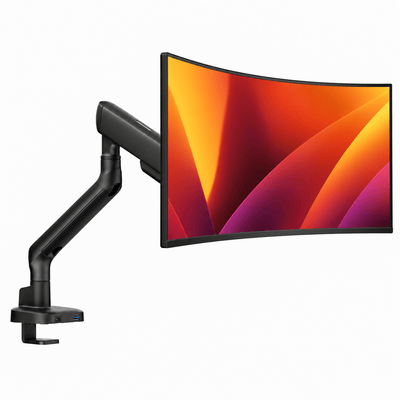
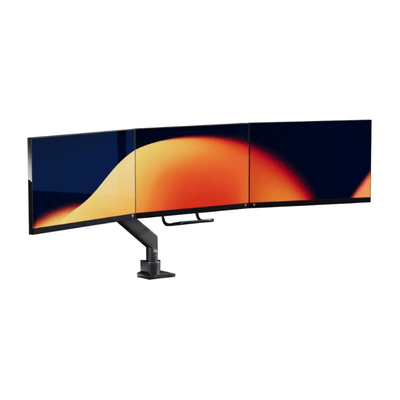
Our monitor mounts

Why distance affects the correct height
You cannot set your monitor height correctly without also considering the viewing distance. A screen that is too close makes small height errors bigger. A screen that is too far away makes you lean forward. The best distance is roughly an arm's length from where you sit. At this distance your eyes move calmly and without effort.
When height and distance are both right, your eyes move more than your head. That is less tiring when reading and during detailed work. When the screen is not positioned well, you move your head more often than necessary, and over time this becomes a habit. With a monitor arm you set height and distance so that they match.
How to set the correct height in practice
Step 1
Start with a stable sitting position, because your posture determines where your eyes are and at what angle you look at the screen. Sit upright with your feet flat on the floor and your shoulders relaxed, so your back can rest naturally. This sitting position is the reference point for all further adjustments. If you set the screen before you are sitting correctly yourself, you often have to readjust it later.
Step 2
Once you are sitting correctly, align the monitor with your natural eye level so your neck stays in a neutral position. The upper third of the screen should sit slightly below your natural line of sight. Your eyes then look slightly downward without you bending your neck. You may need to adjust the height a little a few times before it is exactly right.
Step 3
The viewing distance must match the height of your monitor, otherwise you get tired during focused work. Place the screen at roughly an arm's length from where you sit. If it is too close, small height errors become more noticeable. With the right distance you sit steadily and do not move your head more than necessary.
Step 4
Finally, fine tune everything so you stay comfortable all day. Adjust height and distance in small steps until the tension in your neck disappears. Because your posture changes without you noticing, you sometimes need to do this again. When the screen is easy to adjust, you are also more likely to do it.
Common mistakes that reduce your comfort
One common mistake is placing the screen so that it looks nicely centred, instead of aligning it with your eye level. A screen that looks neatly centred often ignores the natural position of your head. Another mistake is thinking you only need to set the height once. Your posture changes during the day, even if your chair stays the same. With a fixed setup you are less inclined to adjust anything.
Your desk height also makes proper alignment difficult. Most desks are designed for writing, not for placing a screen at the right height. This leads to compromises that feel acceptable at first. Over time your body adapts instead of you improving the setup. With a monitor arm you set the screen height independently of your desk and prevent this.
Why a fixed setup gradually causes discomfort
With a fixed setup, the screen is always in the same place. As your posture changes, the alignment slowly gets worse. Your body compensates without you noticing straight away. Discomfort only appears once the wrong posture has become a habit. That makes the cause hard to find.
An adjustable screen prevents this slow decline. Small corrections keep your posture within a healthy range. The easier it is to adjust something, the sooner you do it. A monitor arm makes this happen naturally.

How do you keep the screen properly adjusted in the long run?
The correct monitor height is part of a workspace you can work at comfortably for years. It is not a one time fix. When the screen height supports your posture, your body stays relaxed without constant effort. That reduces tension during focused work. Small adjustments stay easy and do not pull you out of your work. Over time your setup works with your body rather than against it.
In the long run, regularity is what determines how comfortably you sit.
A setup that adapts prevents discomfort before it develops. Screen height plays a big role in this, especially in workspaces where you also need to know how to set the correct monitor height for dual monitors and where a properly adjusted monitor arm helps keep everything balanced. Keeping the screen properly adjusted is easiest with a monitor arm that moves with you instead of restricting you.
FAQ
What is the ideal monitor height for one screen?
At the ideal height, the upper third of the screen sits just below eye level. You then naturally look down a little without bending your neck. The exact position depends on your posture and your distance from the screen. How comfortably you sit is the best indicator. An adjustable monitor arm helps you keep the screen in the right place.
Should the screen be at eye level or below?
The screen should sit slightly below eye level. If you place it higher, you end up tilting your head back over time. Looking down slightly puts less strain on your neck. This position also feels neutral during long sessions. When you can adjust the height easily, the screen stays in that position too.
Does screen size affect the height?
With a larger screen you need to set the height more carefully. Even then, the top edge should be roughly at eye level. On a large screen, small errors become bigger. You therefore need to balance height and distance together. An adjustable monitor arm makes this a lot easier.
How often should you adjust the monitor height?
Check the height whenever you change how you sit. Making small adjustments during the day means you do not stay in the same posture all day. If adjusting is difficult, you will not do it. When you can move the screen easily, healthier habits develop. That is why an adjustable setup matters so much.



