

A monitor arm can make a desk feel instantly more intentional: screens float at the right height, cables disappear, and the work surface opens up. But before choosing an arm, ask which desks support monitor mounts safely. The answer is not simply “any desk.” Your desktop’s material, thickness, edge shape, and underlying structure all decide whether a mount will feel solid or become the weak point in an otherwise refined setup.
A premium monitor mount deserves a desk that can match its performance. Here is how to assess yours before you clamp, drill, or commit to a new workspace layout.
Which desks support monitor mounts best?
The strongest match is a stable desk with a solid, flat desktop and a usable rear edge. Solid wood, quality plywood, dense MDF, and heavy-duty laminate desks are often excellent candidates, provided the desktop is thick enough and free from structural obstructions beneath the mounting point.
Most clamp-style monitor mounts are designed for desktops roughly 0.4 to 3.3 inches thick, though every mount has its own range. That range matters, but thickness alone does not tell the whole story. A thin desktop made from dense plywood can be more dependable than a thicker hollow-core desktop with little material for the clamp to grip.
A desk that supports a monitor mount well should have three things: a stable base that does not rock, a desktop that resists compression and flexing, and clear access to the back edge or a grommet hole. When those fundamentals are in place, you can build a cleaner, more ergonomic workstation with confidence.
Start with the desktop material
Solid wood and butcher block
Solid wood desks are a strong choice for monitor mounts. Their dense construction handles clamp pressure well, and they offer the substantial feel many design-led workspaces call for. Hardwoods such as oak, maple, walnut, and beech are especially capable, while softer woods may benefit from a reinforcement plate to spread pressure across a larger area.
The trade-off is surface protection. A clamp can leave an impression in softer wood or a delicate finish if it is overtightened. Use the mount’s protective pad, tighten only until secure, and consider a slim metal or hardwood support plate under the desktop for added insurance.
Butcher block desktops also work beautifully, particularly on standing desk frames. Check that the slab is properly supported by the frame and that the chosen mounting point does not sit over a seam, unsupported overhang, or cable tray.
Plywood and quality engineered wood
Plywood is one of the most reliable engineered materials for monitor arms. Its layered construction gives it excellent strength and resistance to splitting, especially when the panel is at least 0.75 inches thick. A quality plywood desk can support a single or dual monitor mount without compromising the clean profile of the workspace.
Dense MDF and particleboard desks can also work, but they require more care. High-quality MDF with a substantial thickness is commonly used in office furniture and can hold a clamp mount well. Lower-density particleboard is less forgiving. It can compress under clamp pressure, swell if exposed to moisture, and weaken around drilled holes.
If your desk uses particleboard or MDF, inspect the underside closely. A solid panel is preferable to a hollow, honeycomb-style core. For heavier displays or dual arms, add a reinforcement plate rather than relying on the desktop alone.
Metal, glass, and hollow-core desktops
Metal desks are often strong enough, but their mounting compatibility depends on design. A flat metal edge can work with a clamp mount, while a folded lip, thin sheet metal, or raised rear frame may block the clamp or create a poor contact point. Always check for clearance underneath.
Glass desktops are usually not a good choice for clamp-mounted monitor arms. Even tempered glass can be vulnerable to concentrated pressure, especially when an articulated arm shifts the monitor’s weight forward and back throughout the day. Unless the desk manufacturer explicitly approves monitor mounts and provides a dedicated mounting solution, choose a monitor riser or a different desk.
Hollow-core desks should be approached with caution. Their light weight may look appealing, but their internal structure is not built for focused clamp pressure or the leverage created by a moving arm. A mount may appear secure at first, then loosen, dent the desktop, or cause the surface to bow over time.
Thickness matters, but edge design matters more than most people expect
A mount’s clamp needs a flat, uninterrupted section of desk to grip. That means the rear edge should not have a thick bevel, decorative molding, deep curve, or raised lip. Even a strong desktop can be incompatible if the clamp only touches a narrow corner rather than sitting flush against the surface.
Look beneath the edge as well. Rear support rails, crossbars, drawers, modesty panels, and cable-management trays can prevent the clamp from tightening correctly. Measure the open space below the desktop before buying. A few inches of clear depth is often enough, but check the mount’s clamp dimensions rather than guessing.
Desks with a cable grommet can offer another route. A grommet mount passes a bolt through an existing cable hole or a purpose-drilled opening, distributing force through the desktop with a top plate and lower washer. This is a polished option for desks without a clamp-friendly edge, though the hole must be appropriately sized and positioned away from weak areas.
Our monitor mounts
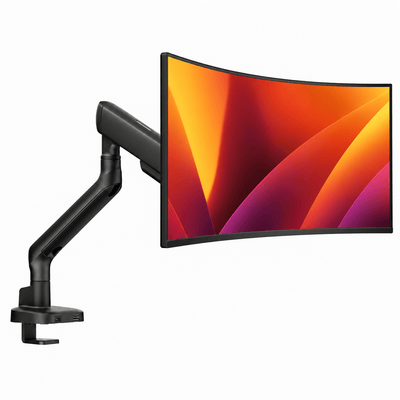


Check the desk’s overall stability
A compatible desktop is only half the equation. A monitor arm changes how weight moves across a desk. As you pull a screen closer, raise it, or swing it to the side, the desk experiences leverage. A lightweight table with narrow legs may wobble even if its desktop holds the clamp perfectly.
This is especially relevant for sit-stand desks. Many standing desks support monitor mounts well, particularly models with sturdy frames and solid desktops. Still, an arm loaded with ultrawide displays or two large monitors can increase screen shake at standing height. The desk’s frame quality, lifting capacity, and crossbar design determine how much movement you will notice while typing.
For a more composed setup, keep the mount near a desk leg or central support when possible. Avoid placing a heavy dual monitor arm at the far end of a long, unsupported desktop. This simple decision can reduce vibration and help the desk retain its balanced, premium feel.
Match mount capacity to the monitor, not just the desk
A desk may support the mount, but the mount must also support the display. Check the monitor’s weight without its factory stand, along with its VESA mounting pattern. A 34-inch ultrawide can weigh more than two smaller office displays, while a large curved monitor places its center of gravity farther from the arm.
Do not choose an arm at the very limit of its stated capacity. A little headroom improves adjustment, reduces gradual drooping, and gives the mechanism a longer working life. This matters even more for double monitor mounts, laptop-monitor combinations, and screens that are frequently repositioned for collaboration, editing, or gaming.
The desk also needs to carry the combined load. Consider the monitor, mount, laptop tray, accessories, and the dynamic force created when the arm extends. A desk does not need to be industrial furniture to handle this, but it should feel settled rather than delicate.
When to reinforce the mounting area
Reinforcement is a smart upgrade, not a sign that your desk has failed. A reinforcement plate spreads clamp pressure across a wider section of the desktop, protecting finishes and reducing the chance of dents, bowing, or cracking. It is particularly worthwhile for MDF, particleboard, thinner wood tops, and heavy monitor configurations.
Use a top-and-bottom plate when appropriate, especially with a grommet mount or a dual-screen arm. The goal is to create a larger, flatter load area so the desktop is not carrying all the force at one small contact point.
If you are unsure whether reinforcement is necessary, look for warning signs: visible flexing when you move the arm, a clamp that sinks into the surface, a desktop with a hollow sound, or a mounting position close to an edge seam. In those cases, reinforce first or choose a monitor riser that keeps weight directly on the desktop.
A quick compatibility check before you buy
Before selecting a mount, measure desktop thickness, inspect the rear edge, and look underneath for rails or drawers. Confirm your monitor’s weight without its stand and decide whether you want a single, dual, or laptop-monitor configuration. Then consider how you actually work: a fixed screen position demands less from a desk than an arm that will be extended, rotated, and adjusted every day.
The best desk for a monitor mount is not necessarily the heaviest or most expensive one. It is the desk with the right structure for your equipment and the stability to keep your screen exactly where your posture needs it. Get that foundation right, and your workspace has room to perform beautifully for years.




