

A desk can look organized and still work against you. The screen sits a little too low, the laptop consumes the best part of the surface, and every cable becomes one more visual interruption. Learning how to upgrade a desk setup starts by treating it as a performance system, not a collection of accessories.
The best upgrades create more usable space, put your body in a more natural working position, and make the entire setup feel intentional. You do not need to replace everything at once. Start with the components that affect every hour you spend at your desk.
Start With the Screen Position
Your display is the visual center of the workspace, so its placement has an outsized effect on comfort and focus. A monitor that is too low encourages a forward head position. One that is too close can make the workday feel more tiring than it needs to be. The target is simple: position the top third of the display around eye level, with enough distance to view the screen comfortably without leaning in.
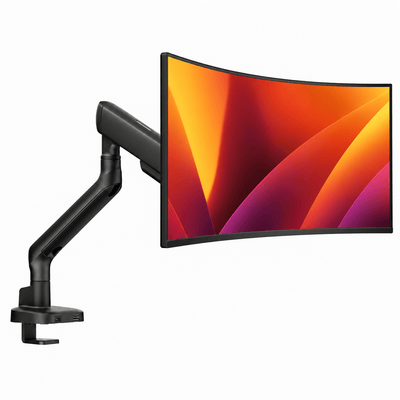
A monitor mount is one of the highest-impact ways to get there. Unlike a fixed stand, an adjustable arm lets you set the display height, depth, tilt, and angle around the way you actually work. It also clears the space beneath the monitor, giving you room for a notebook, charging dock, or simply a cleaner visual field.
If you use two displays, avoid treating them as two separate screens. Position your primary screen directly in front of you and keep the secondary screen close beside it. For equal-use dual-monitor work, center the gap between both displays with your chair. That small adjustment reduces repeated neck rotation over a long day.
Before choosing a mount, check the monitor's size, weight, VESA mounting pattern, and the thickness of your desktop. Heavy-duty hardware matters here. A mount should feel planted when you adjust it, not sag under the display or introduce a distracting wobble every time you type.
Raise the Laptop, Reclaim the Desk
A laptop is built for portability, not ideal all-day posture. When it sits flat on the desk, you are forced to look down. Raising it to screen height changes that relationship immediately, especially when paired with an external keyboard and mouse.
A laptop mount also gives the desk a more defined layout. It can position the laptop beside a primary monitor for messaging, reference material, and calls, or elevate it as part of a compact two-screen setup. For smaller desks, a laptop-monitor mount can be especially effective because it moves both displays off the surface while keeping the work zone compact.
There is a practical trade-off. If you frequently unplug your laptop and leave for meetings, choose a setup that makes docking and undocking simple. The most impressive arrangement is not the right one if it creates friction twice a day. Keep power, display, and accessory connections accessible, and give cables enough slack to move with the arm.
Build Around Your Working Zone
The center of your desk should serve the task you do most. That sounds obvious, but it is where many setups fail. A designer may need room for a tablet and color references. A remote professional may need space for a notebook and camera-ready calls. A gamer may prioritize mouse range and a clean sightline to the display.
Place your keyboard and mouse where your elbows can rest close to your sides and your shoulders can stay relaxed. Keep the items you reach for constantly within easy range. Everything else can move outward, upward, or into storage.
When you upgrade a desk setup, resist the urge to fill every open area. Negative space is functional. It gives you room to think, switch tasks, and keep the desktop from becoming a holding zone for chargers, receipts, and gear that does not belong there.
A useful order of priority is:
- Screen placement and viewing comfort
- Keyboard and mouse position
- Clear desk surface for your primary work
- Storage and accessories for secondary items
Our monitor mounts


Make Cable Management Part of the Design
Cable clutter is more than a visual issue. It makes cleaning harder, complicates equipment changes, and can make an otherwise premium setup look unfinished. The goal is not to make every cable disappear completely. The goal is to create clear, controlled routes.
Start at the source. Mounting monitors and laptops allows power and display cords to travel down the arm rather than across the desktop. From there, group cables by destination: computer connections, monitor power, and charging accessories. A tray beneath the desk can hold the power strip and larger adapters, while clips or sleeves guide the remaining cables along the rear edge or legs of the desk.
Leave a little service loop where equipment moves. Cables pulled tight can limit arm motion and wear faster over time. A clean setup should still be easy to adjust, clean, and troubleshoot.
Choose Materials That Match the Rest of the Room
Ergonomic hardware is visible hardware. It should earn its place visually as well as functionally. Look for clean lines, durable finishes, and designs that complement the desk rather than competing with it. Matte black creates a focused, architectural look. White can make a lighter workspace feel open and deliberate. Metal accents bring structure to wood surfaces without adding visual noise.
This is where premium build quality becomes noticeable. Stable joints, smooth adjustment, and considered cable routing turn an everyday action into something effortless. Alberenz designs its workspace hardware around that balance: serious support for the equipment you rely on, with a cleaner presence on the desk.
Be selective with accessories. A monitor riser can be the right choice when you want a fixed elevation and a place to tuck away a keyboard, while a monitor arm offers more freedom to reposition the screen throughout the day. Neither is automatically better. Your desk depth, monitor weight, and need for flexibility should make the decision.
Add Light That Supports the Work
Lighting changes how a desk feels at 9 a.m. and at 7 p.m. Direct overhead light can cast shadows or create glare on displays, while a single decorative lamp may not provide enough usable illumination. Layered light works better: ambient room light for comfort and a focused source for reading, writing, or detailed work.
Position task lighting to the side of your dominant hand to reduce shadows on paper. Keep bright sources out of direct reflection paths on the monitor. If your screen feels harsh late in the day, reduce surrounding contrast before assuming the display itself is the problem. A softer, balanced environment is easier on the eyes than a bright screen in a dark room.
Upgrade in the Right Order
The fastest way to waste money is to buy accessories before identifying the constraint. If your neck hurts, screen height likely matters more than a new desk mat. If the desk feels crowded, lifting the monitor and laptop may create more value than adding another organizer. If your workday is fragmented by clutter, cable control and designated storage can make a larger difference than a new chair accessory.
Start with one change that removes a daily annoyance. Live with it for a week, then notice what still gets in the way. This approach produces a setup that fits your habits instead of a showroom display that only works in photos.
A better desk should make good posture feel natural, essential tools feel close, and distractions feel less welcome. Build toward that feeling one considered upgrade at a time, and the space will do more than look better. It will make the work you bring to it feel more focused, capable, and ready to move.




