

A desk can look perfectly organized and still work against your body. The screen sits a little too low. Your laptop pulls your shoulders forward. Cables claim valuable space. By late afternoon, the tension in your neck tells the real story. When people ask what accessories improve desk ergonomics, the best answer is not a collection of random add-ons. It is a set of purposeful tools that positions your body, technology, and workflow to perform better together.
The highest-impact upgrades solve the problems you feel every day: a screen that forces you to look down, a keyboard position that crowds your wrists, a chair that cannot quite meet your desk, or a surface overwhelmed by clutter. Start with the accessories that change those fundamentals. Then build a setup that looks as focused as it feels.
What Accessories Improve Desk Ergonomics Most?
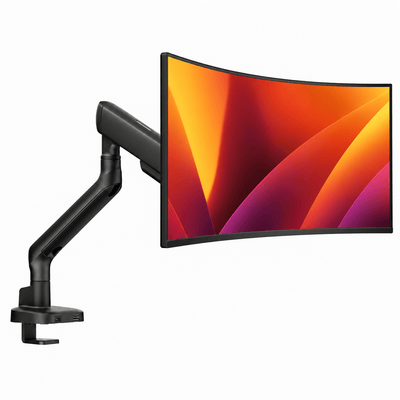
For most desk setups, monitor support is the first upgrade worth making. Your display is the object you look at for hours, which makes its position central to comfort. A premium monitor mount or monitor riser can bring the screen closer to eye level, reduce the need to bend your neck, and free the desk surface beneath it.
The right choice depends on your workflow. A monitor arm offers the greatest range of adjustment and is especially useful when you shift between focused work, video calls, and collaborative viewing. It also gives a clean floating-screen look that opens up the desk visually. A monitor riser is a strong fit when you want a simple fixed elevation, a more grounded aesthetic, or minimal moving parts.
If you use two displays, a double monitor mount can make an even bigger difference. It keeps both screens at a consistent height and distance, rather than leaving one display slightly off-center or lower than the other. Position your primary screen directly in front of you. Place the secondary screen close beside it, angled inward, so you are turning your head gently instead of repeatedly twisting through the neck and upper back.
A Laptop Mount Changes the Working Angle
Working directly on a laptop for long stretches asks your head and neck to follow the screen downward. A laptop mount lifts the display to a more comfortable viewing height and immediately improves the visual balance of the setup. It also creates room underneath for a cleaner, more intentional desk.
There is one essential trade-off: once the laptop is raised, its built-in keyboard is no longer in a practical typing position. Pair the mount with an external keyboard and mouse. This separates screen height from hand position, allowing both to be adjusted for comfort instead of forcing one compromise to serve two jobs.
For hybrid workers and people who move between a laptop and a larger display, a laptop-monitor mount is especially effective. It keeps both screens aligned and creates a command-center layout without consuming the entire desk. The result is a workspace that feels composed, not crowded.
Build Around Neutral Posture, Not Product Count
The goal of ergonomic accessories is not to purchase more equipment. It is to make neutral posture easier to maintain. Your shoulders should feel relaxed rather than lifted toward your ears. Your elbows should rest near your sides while typing. Your wrists should stay straight, not bent sharply up, down, or sideways. Your screen should be high enough that you can view it without a persistent downward tilt of the head.
A keyboard tray can help if your desk is too high for comfortable typing, particularly if lowering your chair would leave your feet unsupported. But it is not automatically necessary. A stable desk, properly adjusted chair, and compact external keyboard may solve the same issue with a cleaner overall footprint. Choose the option that works with your desk height, available space, and preferred sitting position.
A footrest is another accessory that earns its place when your feet do not rest firmly on the floor after your chair is adjusted to the right height for the desk. Supported feet can help you sit farther back in the chair and reduce pressure behind the thighs. Look for a stable surface with a gentle angle, not something so tall that it forces your knees upward.
Support Your Input Devices Too
An ergonomic mouse can reduce strain for people who spend much of the day scrolling, editing, designing, or moving through large spreadsheets. Vertical and trackball designs can be useful for some users because they change the hand and forearm position. They are not universal upgrades, though. A shape that feels awkward can create new tension, and a short adjustment period is normal when switching mouse styles.
A wrist rest deserves a more measured approach. It should support the heel of the hand during pauses, not act as a platform that keeps your wrists bent while typing. If it raises your hands too high or encourages pressure directly on the wrist, remove it. The best keyboard and mouse accessories are the ones that let your hands move freely with minimal effort.
Clear Space Creates Better Movement
Desk ergonomics is also about the space around your body. When cables, chargers, and loose accessories sprawl across the work surface, you reach farther, twist more often, and lose the visual calm that supports focused work. Cable management is not merely a finishing detail. It can make daily movement more direct and the desk easier to use.
Use an under-desk cable tray, cable sleeves, and discreet clips to route power and charging lines away from the active workspace. Keep frequently used items within easy reach and move occasional-use items farther out. This reduces repetitive reaching while giving the setup the polished, intentional appearance that premium hardware deserves.
A monitor arm helps here too. By lifting displays off the desktop, it creates usable room for a notebook, docking station, keyboard, or simply open space. That additional surface area is valuable in smaller home offices, apartments, creative studios, and gaming setups where every inch has a job.
Lighting is another practical consideration. A focused desk lamp can reduce the contrast between a bright display and a dark room, which may make extended screen work feel easier on the eyes. Aim the light at the desk or wall rather than directly at the display. Glare is a productivity drain, and no monitor mount can compensate for a screen positioned in a harsh reflection.
Nuestros soportes de monitor


Choose Heavy-Duty Hardware for the Long Term
A monitor mount is only as good as its stability, adjustment range, and ability to support the display you actually own. Before choosing one, check the monitor size, weight, VESA mounting pattern, desk thickness, and whether you prefer a clamp or grommet installation. A mount that is technically compatible but near its maximum weight limit may not deliver the smooth, confidence-inspiring movement you expect from a premium setup.
Build quality matters because the best ergonomic adjustment is the one you will keep using. Smooth articulation makes it easier to pull a screen closer for detailed work, push it back for more desk space, or shift your viewing angle when the light changes. Heavy-duty hardware also keeps a valuable display steady while preserving the clean lines of the workspace.
Alberenz designs its desk hardware around that combination of strength, adjustment, and modern visual restraint. A well-built mount should disappear into your routine while making the entire setup feel more capable.
A Better Setup Starts With the Biggest Constraint
Do not begin by buying every accessory at once. Start with the discomfort or limitation that appears most often. If your neck feels tight, address screen height and distance. If your desk feels cramped, lift the display with a mount and organize the cables underneath. If you work on a laptop all day, raise it and add separate input devices. If your lower body feels unsupported, revisit chair height and add a footrest only when the floor no longer meets your feet.
Then use the setup for a week. Ergonomics is personal, and the right position can change with your height, chair, desk depth, vision needs, and the work you do. Small refinements matter: moving a display back a few inches, lowering it slightly, or bringing a mouse closer can be more meaningful than adding another product.
The strongest desk accessories do more than fill space. They give your body room to work well, give your tools a clear place to live, and make every return to the desk feel deliberate.




