

A desk covered in cables, stacked notebooks, and misplaced accessories creates friction before the work even begins. The clean desk setup benefits are not limited to a better-looking home office. A considered surface can make your next task easier to start, your screen easier to use, and your workday feel more intentional.
For professionals, creatives, and anyone spending long hours at a screen, the desk is more than furniture. It is the operating surface for focus, communication, and ideas. Clearing it is not about making your workspace look empty. It is about giving every essential tool a purpose and a place.
Clean Desk Setup Benefits Start With Better Focus
Visual clutter competes for attention. Even when you are not consciously thinking about the charging cable, unopened mail, or collection of half-used devices at the edge of your desk, your eyes still register them. That can make a demanding project feel heavier than it needs to.
A clean setup reduces the number of visual decisions waiting for you. Your keyboard, mouse, display, notebook, and daily essentials stay within reach. Everything else moves away from the primary work zone. The result is a desk that feels calmer without becoming sterile.
This matters most when your work requires concentration for extended periods. Writing, editing, coding, designing, planning, and analyzing all benefit from a workspace that does not constantly pull your attention sideways. A clear desk will not eliminate distractions from messages or meetings, but it removes one source of unnecessary noise.
There is a practical advantage, too. When your essentials remain in the same place, you waste less time looking for them. Small interruptions add up across a week. A charger that is always accessible and a notebook that is never buried under paperwork create a smoother start to every task.
More Surface Space, Better Movement
Desk space is valuable, especially in apartments, shared rooms, and compact home offices. A monitor sitting on its original stand can occupy a surprising amount of the surface. Add a laptop, speakers, a dock, and a few accessories, and even a generously sized desk can begin to feel crowded.
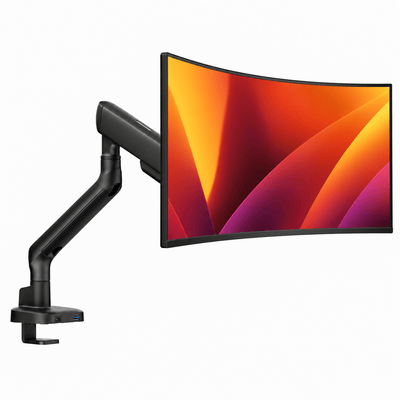
Lifting screens off the desktop changes the entire layout. A monitor mount or monitor riser creates usable space beneath the display for a keyboard, charging station, notebook, or simply more room to move. A laptop mount can do the same while raising the device to a more functional position.
The advantage is not just visual. More open surface area gives you flexibility. You can spread out sketches during a creative session, pull a notebook closer during a call, or switch from focused computer work to hands-on work without rearranging your entire desk first.
A clean desk should still support the way you actually work. If you regularly use reference books, drawing tools, audio equipment, or a physical planner, they do not need to disappear. The goal is to prevent permanent clutter, not to force every work style into a bare minimalist setup. Keep frequently used tools accessible, then give them a defined home when you are done.
A Cleaner Setup Supports Better Ergonomics
A desk can look organized and still work against your body. The strongest clean desk setup benefits appear when visual order and ergonomic positioning work together.
When a display sits too low, many people lean forward or angle their neck downward for hours. When it sits too far away, text becomes harder to read and posture often follows. A quality monitor arm makes it easier to position the screen at a comfortable viewing height and distance, while preserving the open feel of the desk.
For laptop users, the trade-off is especially clear. Working directly on a laptop keeps the setup simple, but it can place the screen below a comfortable eye line. Raising the laptop with a mount and using an external keyboard and mouse can create a more natural working position. It also makes the desk feel more structured, rather than like a temporary landing spot for equipment.
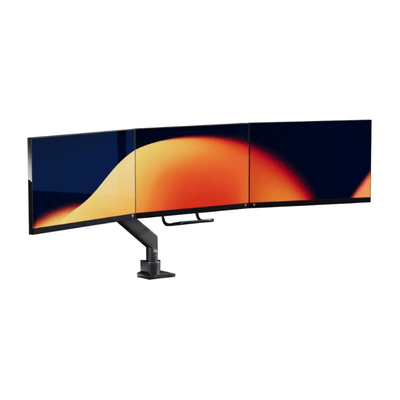
Dual-screen workstations benefit from the same approach. Two monitors on their original stands often create a wide, crowded footprint and make alignment difficult. A double monitor mount can bring displays into a balanced position, reduce desk congestion, and give you more control over the angle of each screen.
Ergonomics are personal. There is no single screen height or desk layout that fits everyone. Your chair height, desk height, eyesight, and work habits all matter. The right setup is the one that lets you sit comfortably, see clearly, and work without repeatedly adjusting your body to fit the equipment.
Nuestros soportes de monitor

Cable Management Makes the Difference
A desk may be technically tidy, but exposed cables can still make it feel unfinished. Power cords, display cables, charging wires, and adapters quickly create visual disorder when they run across the desktop or hang from the back edge.
Cable management is one of the highest-impact upgrades because it improves both appearance and usability. Route cables behind monitor arms, under the desk, or through a dedicated tray. Group only the cables that belong together, and leave enough slack for a monitor arm to move freely. Pulling every wire tight may look neat at first, but it can limit adjustability and strain connectors over time.
It is also worth labeling cables if you use a dock, multiple displays, or frequent device swaps. That small step makes troubleshooting faster and prevents the familiar ritual of unplugging the wrong cord before a meeting.
The objective is not to hide every cable at all costs. Some cords need to remain accessible. The better standard is control: cables should follow a deliberate path rather than becoming a visible tangle.
Your Workspace Becomes More Professional
A polished desk changes how your workspace is perceived, including by you. When your home office appears on video calls, a clean setup communicates preparation and attention to detail without saying a word. It is a subtle signal, but one that matters when you meet with clients, collaborate with a team, or interview remotely.
The personal effect can be just as meaningful. A well-designed workspace creates a clearer transition into work mode. Sitting down at a desk that feels composed can make a Monday morning or late-afternoon push feel less chaotic.
This is where premium materials and considered design earn their place. Heavy-duty mounts, clean lines, and finishes that complement your desk help the workspace feel like a cohesive environment rather than a collection of separate purchases. Alberenz designs this category of hardware for people who want performance without sacrificing the visual standard of their space.
How to Build a Desk That Stays Clean
The hardest part is rarely the first cleanup. It is maintaining the setup after a busy week. A desk that depends on constant perfection will eventually become frustrating. Build simple habits into the layout instead.
Start by defining your daily work zone. Keep only the items you use every day within arm's reach. Move secondary equipment to a drawer, shelf, or side surface. Then choose one landing place for loose items such as earbuds, pens, adapters, and sticky notes. When small objects have no home, they become clutter quickly.
Next, reduce duplicate equipment. You may not need three charging cables, multiple notebooks, or every accessory displayed at once. Keep what earns its place through regular use. Store the rest where it is available but out of sight.
Finally, take two minutes at the end of the day to reset the surface. Return the keyboard and mouse to their usual positions, clear cups and packaging, and put papers away. This is less about cleaning than closing the workday with intention.
A great desk setup does not need to look like a showroom. It needs to make your best work feel easier to begin. Give your screens the right position, give your tools a clear place, and leave enough open space for the next idea to take shape.



