

A premium desk is not defined by a larger screen or a more expensive keyboard. It is defined by how naturally the space supports your best work. Learning how to build a premium desk setup means making every surface, screen, and accessory earn its place - creating a workspace that looks composed, feels comfortable, and performs through long days.
The goal is not to fill a desk with gear. It is to remove friction: the neck strain caused by a low monitor, the visual noise of loose cables, the cramped feeling of a laptop parked in the center of your workspace. Start with a clear standard. Your desk should give you room to think, create, communicate, and reset.
Start With the Work, Not the Accessories
A desk setup should reflect how you actually spend your time. A designer moving between reference material and creative software needs a different layout than a financial analyst working across spreadsheets, or a gamer who uses one large display after hours.
Before buying anything, identify the tasks that keep you at your desk longest. Consider how many screens you need, whether you regularly take video calls, how much paper or hardware lives within reach, and whether the desk serves more than one purpose. This determines the right monitor arrangement, desk depth, and mounting solution.
A single ultrawide monitor can create a focused, streamlined workspace. Dual displays are often better for people who need to compare information, manage communications, or keep a project visible while working in another application. A laptop-and-monitor setup is ideal for hybrid professionals who want desktop-level comfort without losing the flexibility of their primary machine.
Premium means intentional. Choose the layout that improves your workflow, not the one that simply looks impressive in a photo.
Build the Foundation: Desk, Chair, and Screen Height
Your desk and chair establish the geometry of the entire setup. If either is poorly matched to your body, even excellent accessories cannot fully compensate.
Choose a desk with enough depth to maintain a comfortable viewing distance. For most people, a 24-inch-deep surface is the practical minimum, while 30 inches or more creates a more generous working zone for larger monitors, speakers, notebooks, and a full-size keyboard. A stable desktop also matters. A premium mount performs best when it is anchored to a surface that does not flex or wobble.
Your chair should allow your feet to rest flat on the floor or on a footrest, with your knees close to a 90-degree angle. Set the chair height first. Then adjust the desk or keyboard position so your elbows can remain relaxed at your sides instead of lifted toward the work surface.
Screen height is where many otherwise beautiful setups fail. The top third of your main display should sit roughly at eye level, with the screen centered in front of you. If you wear progressive lenses or prefer a slightly lower gaze angle, position it accordingly. The point is to avoid tipping your head upward or folding your neck forward for hours at a time.
Why a monitor mount changes the whole desk
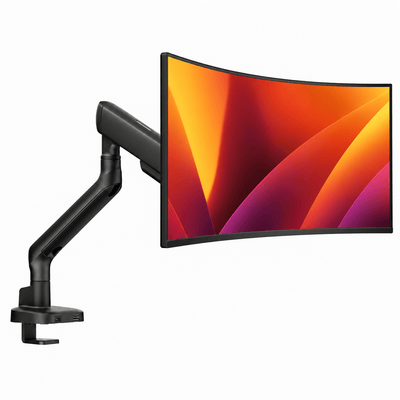
A quality monitor mount does more than raise a display. It gives you precise control over height, depth, tilt, rotation, and alignment. That flexibility lets you build the desk around your posture rather than accepting the limitations of a fixed monitor stand.
It also clears the space beneath the display. The result is a desk that feels larger and more deliberate, with room for a charging dock, notebook, desktop speakers, or simply a cleaner visual field. For dual-monitor users, a heavy-duty double monitor mount can create an aligned, balanced display arrangement without sacrificing valuable desktop space.
Choose a mount rated for your monitor size and weight, especially with larger ultrawide displays. Premium hardware should feel stable when you adjust it and remain stable after you stop. Smooth movement is useful, but dependable holding power is essential.
Create a Display Layout That Reduces Effort
Your primary screen belongs directly in front of you. If you use two monitors equally, place the center point between them in line with your body, then angle each display inward slightly. This creates a natural viewing arc and reduces repetitive neck rotation.
If one monitor is clearly secondary, keep the primary display centered and position the second to the side. A vertical orientation can work particularly well for code, documents, editing timelines, chat, and long web pages. It is not universally better, but it can add useful space without making the desk feel wider or more crowded.
Laptop users should avoid working from the built-in screen at desk level for long periods. A laptop mount raises the display into a healthier viewing position while opening room below it. Pair it with an external keyboard and mouse, and the laptop becomes part of a considered workstation rather than an obstacle at the center of the desk.
For a compact workspace, a laptop-monitor mount is often the most efficient choice. It keeps both screens off the desktop and lets you bring them into a comfortable, unified position. The visual impact is clean. The ergonomic payoff is even better.
Naše držáky na monitor


Make Cable Management Part of the Design
Cable management is not a finishing touch. It is structural. Loose cords make even premium hardware look temporary, and they turn routine adjustments into a tangle of resistance.
Begin by deciding where power enters the setup. A surge protector mounted beneath or behind the desk keeps larger adapters and excess cable length out of sight. Route monitor, laptop, and charging cables along the mount arms or the rear edge of the desktop, leaving just enough slack for full movement. Too much slack looks messy; too little can restrict a monitor arm or strain a connector.
Use cable sleeves or channels to group runs that travel in the same direction. Keep power and data cables organized separately where practical, especially if you are managing many devices. Small cable clips near the desktop edge help keep frequently used charging cables available without leaving them scattered across the surface.
The best cable management is nearly invisible, but still easy to service. Do not build a system so tightly packed that changing a device becomes a frustrating project.
Choose Fewer Accessories, Better Materials
A premium desk setup feels calm because it avoids visual clutter. That does not require an empty desk. It requires a disciplined edit.
Keep only the tools that support your work within arm's reach. A desk mat can define the work zone and protect the surface. A well-made keyboard, mouse, and wrist support can improve daily comfort. A monitor riser may be the right choice for a fixed, elevated display, especially when you value storage underneath and do not need the articulation of a monitor arm.
Material consistency matters more than matching every item exactly. A black aluminum mount, warm wood desktop, and neutral desk mat can feel more elevated than a collection of unrelated finishes. Select one or two dominant tones, then let function guide the remaining choices.
Lighting deserves the same level of attention. Avoid placing a bright light directly behind a monitor, where it can create glare and eye fatigue. A soft task light to one side of the desk, paired with modest ambient light, provides a more comfortable working environment. For video calls, use a diffused light source positioned in front of you rather than relying on harsh overhead lighting.
Plan for Movement and Change
The strongest setup is not static. Your posture changes during the day, your workload changes across the week, and your hardware may evolve over the years. Build in adjustability from the beginning.
Monitor arms make it easy to shift between focused work, collaboration, and presentation mode. A sit-stand desk can be valuable for people who benefit from frequent position changes, but it is not a substitute for movement. Standing still all day can be just as tiring as sitting still. The better approach is variety: change positions, step away between tasks, and reset your shoulders and gaze regularly.
Also consider the future load on your setup. If you may upgrade to a heavier monitor, add a second display, or switch from a laptop to a desktop computer, choose mounting hardware with the capacity and range to support that change. Buying once for durability is usually more efficient than rebuilding around entry-level hardware later.
How to Build a Premium Desk Setup With a Clear Budget
A premium workspace does not require buying everything at once. Prioritize the upgrades that change comfort and usable space first: chair adjustment, monitor position, reliable mounting hardware, and cable organization. These are the elements you interact with every hour.
Then refine the experience through lighting, input devices, storage, and materials. This approach prevents a common mistake: spending heavily on decorative accessories while leaving the monitor too low and the desktop too cramped to work comfortably.
If you are building a multi-screen workspace, invest in the hardware that holds it all together. Alberenz monitor mounts and workspace accessories are designed for this exact balance of performance, stability, and modern restraint. A well-engineered mount is not just a support component. It is the foundation for a cleaner, more adaptable desk.
Your workspace should make the next hour feel easier than the last. Set it up with purpose, leave room to move, and choose the pieces that make showing up to your desk feel like an upgrade.




