

A screen sitting too low changes more than your posture. It changes how your desk feels at 10 a.m., how your shoulders feel at 4 p.m., and how much visual noise competes for your attention all day. Premium monitor mounts turn that static screen into an adjustable part of your workspace, creating a desk that looks sharper and works harder.
For professionals, creatives, gamers, and remote teams, the appeal is not simply getting a display off the desk. It is building a setup around the way you actually work. The right mount gives your monitor a better position, gives your desk more usable surface, and gives the entire space a more intentional finish.
Why monitor mounts change the way you work
A monitor stand sets one fixed height. A monitor mount gives you control. You can raise a display to eye level, pull it closer for focused work, push it back when you need room to write, or rotate it into portrait mode for code, documents, and editing timelines.
That range matters because no two workdays are identical. You may spend the morning in spreadsheets, the afternoon reviewing designs, and the evening gaming or watching content. A well-built arm lets your screen respond to the task instead of forcing you to adapt your body to the screen.
The visual difference is just as immediate. Lifting a monitor clears the area beneath it, making room for a keyboard, notebook, charging dock, or simply more breathing room. Cable management keeps power and display cables routed along the arm rather than hanging across the desktop. The result is a cleaner silhouette with less distraction in your line of sight.
There is an ergonomic payoff, too. When the top third of the screen sits roughly at or just below eye level, you are less likely to work with your chin dropped toward the desk. The best position still depends on your height, chair, desk, and vision needs, but adjustability gives you a practical way to find it.
Choose a mount around your monitor, not the other way around
A premium mount should feel effortless once installed, but choosing one requires a few measurements. The most common mistake is selecting based only on screen size. Size is useful, but it does not tell the full story.
Start with weight and VESA compatibility
Every monitor mount has a supported weight range, usually measured per screen. Check the actual weight of your monitor without its factory stand, then choose an arm rated comfortably above that number. A mount at the edge of its capacity may function, but a stronger fit delivers steadier positioning and better long-term performance.
Next, confirm the VESA pattern on the back of your display. Many monitors use a 75 x 75 mm or 100 x 100 mm mounting pattern. If your monitor has a recessed VESA area, curved back, or unusual design, review the available clearance before ordering. The goal is a clean, secure connection without improvised hardware.
Match the mount to your desk
Your desk matters as much as your monitor. Clamp-mounted arms are ideal for most desks with an accessible rear edge and a stable top. They preserve the surface and make installation straightforward. A grommet mount can be the better choice when the desk has a cable hole or when you want a more fixed, centered installation.
Pay attention to desktop thickness and material. Solid wood, metal, and quality laminate desks typically offer dependable support. Fragile particleboard, hollow-core tops, or glass surfaces may need reinforcement or a different solution. Heavy-duty performance starts with a stable foundation.
Also consider where the arm needs to move. A desk placed against a wall may limit how far a monitor can swing backward. A deep desk gives you more freedom to position the screen at a comfortable distance. On a shallow desk, an arm with a compact footprint and forward reach can make a meaningful difference.
Pick the configuration that supports your work
The cleanest desk setup is not always the setup with the fewest screens. It is the setup where every display has a purpose.
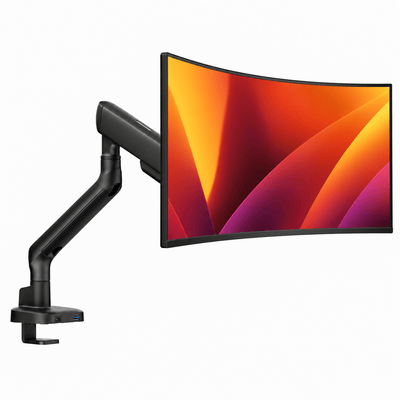
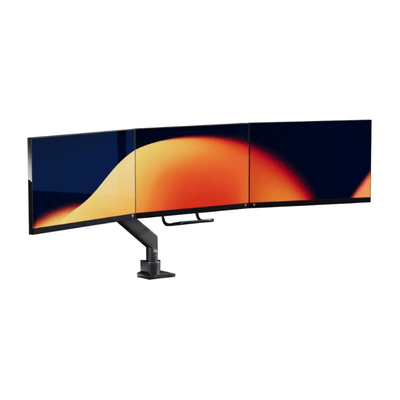
A single monitor mount is a strong choice for focused work, compact desks, and large ultrawide displays. It creates an open, centered workstation without adding complexity. If you frequently switch between applications, reference material, messaging, and meetings, a double monitor mount can create a more efficient visual workflow while preserving desk space.
A laptop-monitor mount brings another level of flexibility. It raises the laptop beside a primary screen, helping you keep both displays within a more natural viewing range. This is particularly useful for hybrid workers who move between a laptop-only setup and a full desktop station. Rather than leaving the laptop low on the desk, you create a coordinated dual-screen layout that feels considered and capable.
Portrait orientation is worth considering if you work with long documents, code, social content, or vertical editing tools. Not every monitor or arm is suited to a full rotation, especially when a screen is large or close to a wall. Still, for the right workflow, a vertical secondary display can be one of the most useful upgrades you make.
Nasze uchwyty do monitorów

Position your screen for comfort and focus
Installing a mount is only half the job. Fine-tuning its position is where the workspace begins to feel personal.
Start by sitting in your normal working posture, not your most upright posture for a quick measurement. Adjust the monitor so you can look at the center of the screen without consistently bending your neck. Keep the display about an arm's length away as a starting point, then adjust for screen size, resolution, and visual comfort.
Tilt the screen only enough to reduce glare and maintain a comfortable viewing angle. Excessive tilt can make a premium setup feel awkward, especially with multiple displays. If you use two monitors, place your primary display directly in front of you. Position the secondary screen close beside it, with the inner edges nearly touching, so you are not repeatedly turning your neck through a wide angle.
For a laptop and monitor pairing, avoid treating the laptop as an afterthought. Raise it so its top edge aligns more closely with the external display, then angle both screens toward your seated position. The setup should feel balanced from the chair, not merely look symmetrical from across the room.
The details that make a mount feel premium
Not all monitor mounts perform the same after the first week. A premium arm is defined by what happens after hundreds of adjustments: whether it holds position, moves smoothly, stays stable while typing, and keeps cables controlled.
Look for durable materials, a secure clamp or grommet base, and tension adjustment that can be tailored to your display weight. A heavy monitor should not slowly sink during the workday. A light display should not spring upward every time you touch it. Good tension control makes movement precise rather than fussy.
Cable management deserves equal attention. Loose cables can undermine an otherwise refined desk, especially on sit-stand desks where extra slack is necessary. Route cables through the arm where possible, leave enough length for the full range of movement, and test the desk at its highest position before securing anything. A clean cable path protects the polished look you invested in.
A mount should also support the visual weight of your setup. Clean lines, thoughtful finishes, and a low-profile base let the screen appear to float without making the desk feel overengineered. That balance is why workspace hardware is more than an accessory. It is part of the design language of the room.
Build a desk that earns its space
The best desk upgrades solve multiple problems at once. They improve comfort, clear clutter, support better habits, and make the work area feel more like a place you want to return to. That is the value of choosing performance-led hardware rather than settling for a fixed stand or a lightweight arm that cannot keep up.
Alberenz monitor mounts are designed for people who expect their workspace to match their standards: strong where it counts, refined in every detail, and built for the long workdays that shape modern life. With the right configuration, your screen stops occupying your desk and starts elevating it.