

A screen that sits even two inches too low can change the way a full workday feels. You lean forward, your shoulders follow, and a desk built for focus starts working against you. The monitor riser vs monitor stand decision looks simple at first, but the right choice depends on how you work, what your desk needs to hold, and whether your setup needs to adapt over time.
A monitor riser creates a clean, elevated foundation. A monitor stand usually refers to the height-adjustable base included with a display, or a separate support that gives the screen more positioning flexibility. Both can improve viewing height. They solve the problem in very different ways.
Monitor Riser vs Monitor Stand: The Core Difference
A monitor riser is a platform that lifts your display above the desk surface. It is typically fixed in height, though some designs offer more than one assembly option. The monitor sits on top, while the space below becomes useful storage for a keyboard, notebook, dock, or other daily essentials. It is a straightforward upgrade for people who want a more intentional desk without adding moving parts.
A monitor stand is built to support and position the display itself. In many cases, it is the pedestal attached to the monitor from the manufacturer. It may allow tilt, swivel, pivot, or limited height adjustment. Separate monitor stands can also be freestanding supports designed around one display.
The practical distinction is this: a riser elevates the desk surface beneath your screen, while a stand is primarily responsible for the screen's position. That difference affects posture, storage, visual balance, and how easily your setup can evolve.
Choose a Monitor Riser for a Cleaner, More Structured Desk
A riser earns its place when your monitor is already at a workable height, but needs a modest lift. It is especially effective with displays that have fixed or low-profile factory bases. Instead of replacing the display or introducing a larger mounting system, you create a higher visual line with one refined piece of desk hardware.
The space underneath is a major advantage. Slide your keyboard beneath the platform at the end of the day and the desk instantly feels more open. Keep a charging hub, external drive, or small notebook out of sight but within reach. For compact desks, that reclaimed surface can matter as much as the elevation itself.
A monitor riser also makes sense when aesthetics carry equal weight with ergonomics. A wide, stable platform can visually anchor a monitor, laptop, and accessories into one composed workstation. The effect is less like adding office equipment and more like giving your setup a proper foundation.
Where a Riser Has Limits
A riser cannot offer the full range of movement that an adjustable monitor stand or monitor mount can. Once your display is on the platform, the height is set. If you alternate between sitting and standing, share a desk, or regularly change from solo work to client presentations, a fixed platform may be too restrictive.
You also need to check dimensions carefully. The riser must support the weight of your monitor and have a top surface deep enough for its base. A narrow platform can leave a large monitor feeling unstable, while an oversized riser can consume more desk depth than it gives back.
Choose a Monitor Stand When Adjustment Is the Priority
A monitor stand is the better fit when exact positioning matters more than under-monitor storage. Proper screen height is personal. Your ideal position depends on chair height, desk height, torso length, vision needs, and the type of work on screen. A stand with meaningful height adjustment lets you dial that in rather than settle for a close approximation.
For most seated setups, the top of the display should sit at or slightly below eye level. Your eyes should naturally meet the upper portion of the screen without lifting your chin or dropping your head. The display should also be far enough away that text is comfortable to read without leaning in. A stand that can raise, tilt, and swivel helps you find this position with less compromise.
This flexibility is valuable for creative work and gaming, where viewing angles change throughout the day. It also helps if glare shifts across the room. A small tilt adjustment can make the difference between an image you can see clearly and a screen that forces constant squinting.
Understand the Factory Stand You Already Have
Not all monitor stands are created equal. Some premium displays include solid bases with generous height, tilt, swivel, and pivot adjustment. Others have a simple fixed pedestal that only tilts. The word “stand” on a product page does not automatically mean ergonomic freedom.
Before buying an add-on, check your monitor's existing range of motion. If it already reaches your ideal height, a riser may only be necessary for storage or visual organization. If it cannot go high enough, a riser can bridge the gap. If you need frequent changes, an adjustable solution will be more satisfying in the long run.
Nos bras de moniteur

Consider a Monitor Mount When Neither Is Enough
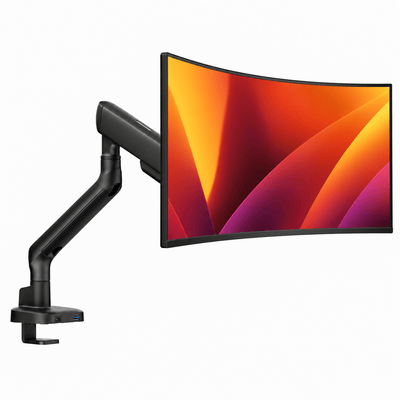
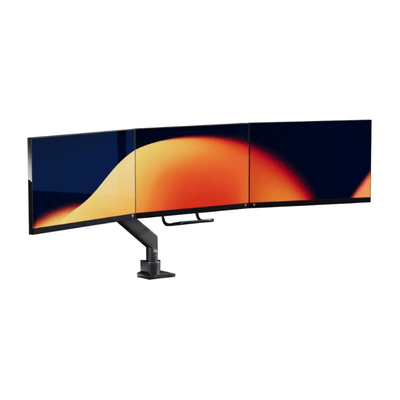
There is a third option worth considering: a monitor mount. While the monitor riser vs monitor stand comparison is useful, a mount can be the stronger answer for highly adjustable, space-conscious workspaces. It lifts the monitor off the desk entirely and usually offers broad height, depth, tilt, swivel, and rotation adjustment.
That makes a mount ideal for dual-monitor desks, sit-stand desks, deep screens, and workstations that need to switch between tasks quickly. It also frees the entire area below the screen for a laptop, keyboard, speakers, or a cleaner visual field.
The trade-off is installation and desk compatibility. Clamp-mounted arms need an appropriate desk edge, while grommet-mounted options require an opening in the desktop. A quality mount should be matched to the monitor's weight, size, and VESA pattern. Done well, it delivers a floating, performance-driven setup. Done without checking specifications, it can create unnecessary instability.
How to Make the Right Choice for Your Setup
Start with the discomfort you are trying to solve. If your screen is simply too low and your desk feels cluttered, a riser is often the most elegant move. It adds elevation, creates a storage zone, and keeps the setup grounded. This is a particularly strong choice for laptop-and-monitor workstations where the laptop can sit beneath or beside the elevated display.
If you are still experimenting with position, buy for adjustability. A monitor stand with height and angle control gives you room to refine your posture as your chair, desk, or workflow changes. It is also the safer choice for shared workspaces where more than one person uses the same screen.
If your goal is maximum usable desk space, broad movement, or a polished multi-screen arrangement, a monitor mount deserves serious consideration. A premium mount turns the monitor into an adjustable tool instead of a fixed object taking up the center of the desk.
Think about visual proportion, too. A small monitor on a tall, wide riser can look disconnected. A large ultrawide display on a lightweight factory stand can make the desk feel crowded and unstable. The best setup has a sense of balance: enough support for the screen, enough clearance for your hands and accessories, and no hardware that distracts from the work.
Details That Matter Before You Buy
Measure your desk depth and available width before committing. Your screen should sit far enough back to provide a comfortable viewing distance, and a riser should not push it too close to the edge. Check the monitor's weight, including its factory base if it will remain attached. For a mount, confirm VESA compatibility and review the desk's material and thickness.
Cable management deserves the same attention. A riser can hide a power strip or dock beneath its platform, while a stand may leave cables more visible. A mount can create the cleanest result when it includes routing channels, though cables still need enough slack for movement. The goal is not merely fewer visible wires. It is a desk that remains easy to adjust, clean, and use.
Finally, avoid choosing purely by price. The right support hardware carries a display that may be central to eight or more hours of your day. Stable construction, thoughtful dimensions, and a finish that belongs in your workspace will continue to pay off long after a cheaper shortcut starts to feel temporary.
Your desk should support the way you want to work: focused, comfortable, and clear. Choose the solution that gives your screen the right place, then let everything else on the desk fall into order around it.



