

A screen that sits two inches too low can turn a beautiful desk into a place you avoid by 3 p.m. The monitor riser vs desk shelf decision looks small, but it affects posture, usable space, cable clutter, and how intentional your entire setup feels.
For some desks, a compact riser is the cleanest route to a more comfortable viewing height. For others, a full-width shelf creates the visual order and storage capacity that a busy workstation needs. The better choice is not about buying the largest accessory. It is about giving your screen, tools, and workflow the right foundation.
Monitor Riser vs Desk Shelf: The Core Difference
A monitor riser is typically a compact platform designed primarily to elevate one display. It may be wood, metal, acrylic, or a combination of materials, and it usually occupies only the footprint needed to support the monitor. Its purpose is direct: bring the screen closer to eye level while creating a small storage zone beneath it.
A desk shelf is broader and more architectural. It spans a larger section of the desktop, often running beneath a monitor, laptop stand, speakers, dock, notebook, and daily essentials. It raises the visual plane of the setup while establishing a second level of storage.
The terms can overlap. Some brands call a wide monitor stand a desk shelf, while others call a compact shelf a monitor riser. Instead of focusing on the label, look at three things: how much height you need, how much desktop space you want to reclaim, and whether your setup is likely to grow.
Choose a Monitor Riser When Height Is the Main Goal
A monitor riser makes sense when your desk is already fairly organized and the display itself is the problem. If your screen is below a comfortable sightline, a stable platform can lift it without adding a large structure across your work surface.
This approach works especially well for a single-monitor desk, a compact home office, or a workstation that needs to stay visually light. A smaller riser preserves more open desk area for writing, sketching, or using a full-size keyboard and mouse mat. It can also be easier to reposition if you regularly change your desk layout.
There is a practical limit, though. A riser only helps if its height suits your body and chair position. Ideally, the top third of the screen sits around eye level or slightly below it, so you can view the display without tilting your head downward for long stretches. Very tall risers can create a new problem if they force your chin up.
Consider the monitor’s base, too. A wide or unusually shaped stand can consume much of a compact riser’s surface. Measure the stand, not only the display size. You also need enough depth for the base to sit fully supported, with no overhang or instability.
A riser is a smart choice if you want a focused improvement with minimal visual impact. It is less effective if your desk is crowded with accessories that still need a home.
Where a riser earns its place
A monitor riser is often the better fit for professionals using one display, students with smaller desks, and minimalists who want one clean upgrade rather than a complete desktop rebuild. It can also work well beside a monitor arm, where the arm handles precise ergonomic positioning and the riser provides a neat place for a dock, keyboard, or notebook.
Choose a Desk Shelf When Organization Matters as Much as Height
A desk shelf earns its place when the desktop feels flat, cluttered, and visually noisy. By adding a raised tier across a wider area, it gives the setup structure. The monitor sits above, while the space below becomes a deliberate home for the items that would otherwise drift around the desk.
That lower zone can hold a keyboard when you need room to write, a laptop, audio interface, charging hub, notebook, or small accessories. The result is not just more storage. It is a workstation with clearer zones for focused work and off-screen tools.
A desk shelf is particularly useful for creatives, gamers, and hybrid workers managing multiple devices. A laptop, tablet, external drive, speakers, and display can all compete for space. A wider shelf helps these pieces coexist without making the desk feel overloaded.
The trade-off is footprint. A desk shelf can dominate a shallow desktop, especially if the monitor’s stand already extends forward. Before choosing one, measure the depth from the back edge of your desk to where your keyboard naturally sits. You want enough clearance to type comfortably without pushing the shelf or screen uncomfortably close.
Desk shelves also need a stronger visual commitment. A well-designed shelf can make a workspace feel considered and premium. A poorly proportioned one can make the desk look top-heavy. Match the shelf width to the scale of your desk and display, rather than choosing the widest option by default.
Where a desk shelf performs best
Choose a desk shelf when you use a larger desk, work with several accessories, or want your workstation to feel more composed from every angle. It is also a strong option for people who frequently switch between laptop work and handwritten work, since the open space underneath makes it easier to clear the main surface quickly.
Nos bras de moniteur


Ergonomics: Height Helps, Adjustability Helps More
Neither a monitor riser nor a desk shelf offers the same flexibility as a monitor mount. A fixed platform raises the screen by one set amount. If that height is right, it is simple and effective. If it is wrong, you may end up stacking books, adjusting your chair too high, or compromising your posture to make the setup work.
This does not mean fixed shelves are a poor ergonomic choice. It means they work best when you have measured first. Sit in your normal working posture, with feet supported and shoulders relaxed. Note where your eyes land on the screen. Then determine how much lift the display actually needs.
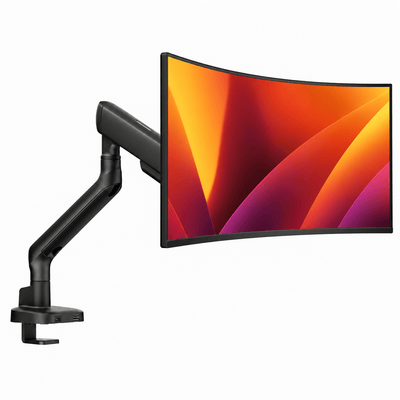
For more precise control, a monitor mount can be the stronger long-term foundation. It allows height, tilt, and distance adjustments while freeing the desk surface beneath the display. Pairing a mount with a desk shelf can be particularly effective: the arm positions the monitor exactly where your body needs it, while the shelf organizes everything below.
Alberenz designs its workspace hardware around this kind of performance-minded balance, where comfort and clean visual lines work together rather than competing for space.
Stability and Weight Capacity Are Non-Negotiable
The best-looking shelf is not a good upgrade if it flexes, slides, or makes you question whether your display is secure. Review weight capacity with the full setup in mind. Include the monitor, its stand, speakers, a laptop, and anything else that will sit on the surface.
Material matters, but construction matters more. Thick hardwood can feel substantial, yet weak joinery may still introduce movement. Metal can be exceptionally strong, but thin legs or poor bracing can create wobble. Look for a stable base, clean edges, non-slip feet, and a load rating that comfortably exceeds your actual equipment weight.
Pay attention to the desk underneath as well. A solid riser on a flimsy, uneven surface will not feel stable. If your desktop has a pronounced lip, cable tray, or rear support bar, confirm that the shelf sits flat before you commit to the layout.
Style Should Support the Way You Work
A monitor riser usually disappears into a minimalist setup. It creates a small lift, a subtle layer, and enough room to tuck away a keyboard or accessories. If you prefer an uncluttered desk with one display and a few essential tools, that restraint is a strength.
A desk shelf becomes part of the setup’s architecture. It can frame a display, create symmetry with speakers, and make a wide desk feel curated rather than empty. This is valuable when your desk is visible on video calls or serves as a personal creative space after work.
Choose finishes thoughtfully. A light wood shelf can soften a black-and-metal setup. Dark finishes can create a more focused, studio-like look. Matte metal often pairs naturally with monitor arms and laptop mounts. The goal is not to match every item perfectly. It is to create a setup that looks intentional instead of assembled over time.
The Better Choice for Your Desk
Choose a monitor riser if you need a simple screen-height improvement, use one monitor, and value an open desktop. Choose a desk shelf if storage, visual structure, and multi-device organization are equally important. If your screen position changes throughout the day or you want exact ergonomic control, start with a monitor mount and add a shelf only when the extra tier serves a real purpose.
Measure your display stand, desk depth, preferred typing position, and the accessories you use every day. The right platform does more than lift a screen. It gives your work a clearer place to happen.




