
A trading desk has no room for screen drift, clutter, or an awkward viewing angle. When price action moves quickly, the last thing you need is a monitor that sits too low, wobbles when adjusted, or consumes half your usable desk surface. The best monitor mounts for trading create a cleaner command center: screens at eye level, charts arranged with intent, and more space for the tools that actually matter.
A premium mount is not just a visual upgrade. It is a performance upgrade for the hours spent reading order flow, comparing timeframes, monitoring news, and managing positions. The right choice depends on your screen count, monitor weight, desk construction, and how often you need to reposition your display.
What Traders Need From a Monitor Mount
Trading is a different use case from casual office work. A spreadsheet may live comfortably on one display. A trader may need a primary charting monitor, a secondary screen for market depth or execution, and another for news, watchlists, or broader market context. That makes stability the first requirement.
A quality monitor mount should hold its position without sagging, shifting, or vibrating as you type. It should also offer enough adjustment to place the center of your main display near eye level. Looking down at charts all day can turn a focused setup into a source of neck and upper-back strain.
Clean cable management matters more than it sounds. Multiple display cables, power cords, chargers, and peripherals can quickly make a trading station feel crowded. A mount with integrated cable channels keeps those lines contained and makes your desk look considered, not improvised.
Best Monitor Mounts for Trading by Screen Setup
There is no single best configuration for every trader. Start with the number of displays you use now, then allow for the way your setup may grow over the next year.
One monitor: a premium single monitor arm
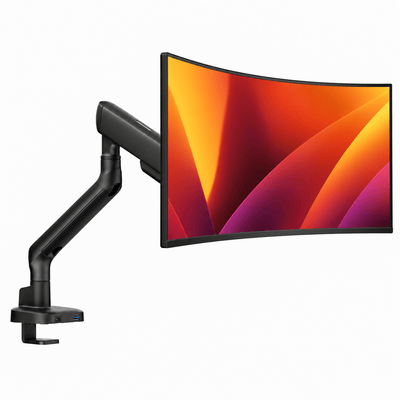
For a trader working from one ultrawide or one large display, a heavy-duty single arm is the smartest choice. It lifts the screen off the desk, creates room for a notebook or keyboard adjustments, and lets you fine-tune height, depth, tilt, and rotation.
This is also the best option for anyone who alternates between trading, remote work, and personal use. Pull the screen closer for focused chart work, then push it back to open up your desk. Just make sure the arm is rated for both the weight and size of your monitor. Large ultrawides often weigh more than buyers expect, especially with the stand removed.
Two monitors: a double monitor mount
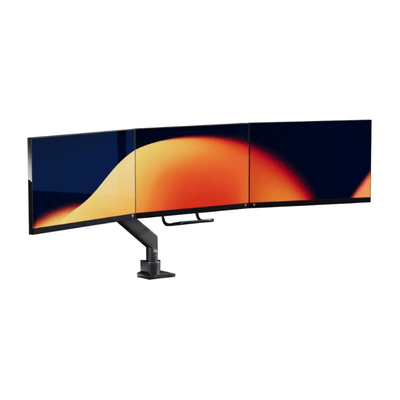
A double monitor mount is the natural choice for most active traders. Two screens offer meaningful separation without overwhelming a standard desk. You can run a primary display directly in front of you for execution and place a second screen beside it for charts, news, or watchlists.
Look for independent arms rather than a fixed crossbar if you want maximum control. Independent adjustment makes it easier to align monitors with different sizes, set one display slightly higher, or switch one panel into portrait orientation. A fixed dual mount can look exceptionally clean, but it is usually better for two identical monitors that will stay in a consistent side-by-side arrangement.
Three or more screens: modular arms and disciplined planning
More screens can add useful context, but only when every display has a job. A three-monitor layout can work beautifully with two landscape screens and one vertical display for headlines, chat, watchlists, or a long order book. Beyond that, planning becomes essential.
Avoid mounting a wall of screens simply because your desk can accommodate it. Excessive width forces you to turn your head repeatedly, while overly stacked displays can pull your gaze too high. For larger configurations, use modular mounting hardware, confirm the total load capacity, and keep the primary execution display centered. The goal is fast visibility, not visual noise.
Check Weight Capacity Before You Buy
Monitor weight is the technical detail that determines whether a mount feels refined or frustrating. Every arm has a stated weight range, and that range applies to each screen, not just the combined setup. Verify your monitor's weight without its original stand, then choose a mount with comfortable headroom above that figure.
Do not treat the maximum rating as a target. An arm supporting a screen near its limit may still function, but adjustment can feel less controlled and long-term performance may suffer. A heavier mount built for heavier displays tends to deliver a more planted, confident feel.
Screen size matters too, though weight is usually the deciding number. A wide monitor creates leverage on the arm, particularly when extended away from the desk. If you use a 34-inch or 49-inch ultrawide, prioritize a mount specifically designed to manage that format rather than assuming a standard arm will be enough.
Nos bras de moniteur

Clamp Mount or Grommet Mount?
Most monitor mounts attach through a desk clamp or a grommet mount. A clamp is the simplest route. It grips the rear edge of the desk and is ideal for most solid desktop surfaces. It also makes future changes easy if you move desks or want to reposition your setup.
A grommet mount passes through an existing cable hole or a drilled opening in the desktop. This can provide an exceptionally clean finish and may be useful for heavy multi-monitor layouts. The trade-off is permanence. You need the right hole placement, enough clearance below the desk, and a desktop material that can handle the pressure.
Before ordering either style, measure the thickness of your desk and inspect its construction. Thin glass, hollow-core desks, and fragile particleboard surfaces may not be suitable for a heavy mount without reinforcement. A premium mount deserves a desk foundation that is equally dependable.
Build a Layout Around Your Primary Screen
The most effective trading layouts give your main screen priority. Place it directly in front of your chair, not off to one side. This is where your execution platform, primary chart, or most time-sensitive information should live.
Set secondary monitors close enough that you can read them with a small eye movement rather than a full head turn. A slight inward angle on side displays helps create a natural viewing arc. If you use a vertical monitor, position it to the side rather than making it your primary screen.
Height is equally important. Start with the top third of the primary display around eye level, then make small adjustments based on your posture and viewing distance. There is no universal measurement because chair height, monitor size, and personal preference all matter. The right setting is the one that lets your shoulders stay relaxed and your head remain neutral through a long session.
Features Worth Paying For
The difference between a basic mount and a lasting workspace upgrade is often found in the details. Prioritize these features when comparing options:
- A heavy-duty weight rating with room above your monitor's actual weight
- Smooth, independent height and depth adjustment
- Tilt, swivel, and rotation for precise screen positioning
- Integrated cable management that keeps wires off the desktop
- A durable clamp or grommet base built to resist movement
Common Mistakes That Undercut a Trading Setup
The cheapest mount is often a false economy when it cannot support your display properly. Another common mistake is buying for the setup you have today without considering the monitor you plan to add next. If an upgrade is likely, choose a system with enough capacity and flexibility to accommodate it.
Traders also tend to place screens too high in pursuit of a dramatic multi-monitor look. That may photograph well, but comfort wins over aesthetics when the market is open. Keep frequently viewed information within your natural line of sight, and reserve higher screens for less urgent reference material.
Finally, do not overlook desk depth. A monitor arm can free up surface area, but it cannot create a comfortable viewing distance on an overly shallow desk. If you sit close to large displays, use the arm's depth adjustment to position them farther back while keeping your keyboard and mouse in a relaxed reach zone.
A trading desk should feel composed before the opening bell, not crowded and compromised. Choose a mount that supports the displays you rely on, leaves room to think, and holds its position with quiet confidence. That is the kind of everyday performance Alberenz builds its workspace hardware around.



