

A screen that sits even a few inches too low can change the feel of an entire workday. Your shoulders creep forward, your neck starts compensating, and the desk you carefully set up begins to feel like a constraint. The desk shelf vs monitor arm decision is not just about where a display sits. It determines how your workspace moves, how much surface you keep, and how polished the final setup feels.
Both options can elevate a monitor above the desk. The better choice comes down to your work style, equipment, available space, and how often your setup needs to adapt. A desk shelf delivers grounded structure and visual presence. A monitor arm delivers precise control and a lighter, more open desk.
Desk Shelf vs Monitor Arm: The Core Difference
A desk shelf, sometimes called a monitor riser, is a fixed platform that raises your display above the desktop. It creates a dedicated layer for your monitor and often leaves useful storage space beneath it for a keyboard, notebook, audio interface, or everyday accessories. It is a simple, intentional solution for a desk that does not need to change throughout the day.
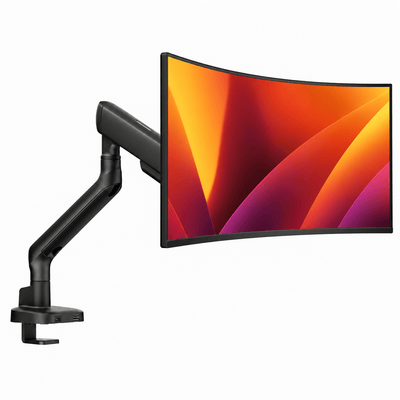
A monitor arm clamps or bolts to the desk and holds the display from behind or beside it. Most quality arms offer height adjustment, extension, tilt, swivel, and rotation. Rather than working around the position of your monitor, you can place the screen exactly where your posture and task require it.
That difference matters most after the initial setup. A shelf establishes a strong visual anchor. An arm makes the monitor a responsive part of your workspace.
Choose a Desk Shelf for Structure and Style
A desk shelf works best when you want a considered desk layout with minimal moving parts. It is especially effective for professionals and creatives with a single monitor, compact desktop speakers, a laptop, or a small set of tools they use every day.
The visual benefit is immediate. A well-proportioned shelf adds dimension to a flat desk and creates a defined home for your display. It can make a wide desktop feel more curated without looking busy. If you care about materials, finish, and symmetry, a shelf offers an architectural quality that a floating monitor cannot always match.
It also provides a practical layer of storage. Slide a keyboard underneath at the end of the day, keep a charging hub out of sight, or use the space for a notebook that would otherwise live in front of your monitor. For smaller desks, that added vertical organization can be genuinely useful.
There are trade-offs. A shelf consumes desk depth and fixes the monitor at one horizontal position. You can raise the screen by choosing the right shelf height, but fine adjustments are limited. If you share a desk, switch between sitting and standing, or regularly move your display closer for detailed work, a fixed riser can feel restrictive.
A shelf also needs enough stability to match your monitor. A lightweight platform under a large ultrawide display can look and feel out of proportion. Measure the monitor stand footprint, the shelf surface, and the usable desk depth before committing.
Best desk shelf setup
Choose a desk shelf when your monitor stays in one place, your desk layout is carefully planned, and under-monitor storage would make the surface work harder. It is a strong choice for a focused home office, a design-led studio desk, or a clean laptop-and-monitor setup where visual balance is part of the brief.
Choose a Monitor Arm for Ergonomic Control
A monitor arm is built for people who want their screen to meet them where they work. It lets you set the top of the display near eye level, bring the screen closer without sacrificing desk space, and reclaim the area under the monitor entirely.
That flexibility becomes valuable during long sessions. If you lean back for a video call, pull a screen forward for timeline editing, or shift a display to the side while sketching or reviewing paperwork, an arm handles the adjustment in seconds. The monitor no longer dictates your posture.
Monitor arms are also a standout solution for shallow desks. Standard monitor stands can place a display several inches from the rear edge, leaving limited room for a keyboard, mouse, and forearms. An arm can position the screen farther back, higher, or closer as needed while keeping more usable surface in front of you.
For dual-monitor work, the advantage grows. Two displays on their original stands consume a surprising amount of desk real estate and rarely line up perfectly. A double monitor mount creates a more deliberate visual plane, keeps both screens at a comfortable height, and makes it easier to angle them around your natural viewing position.
The main consideration is compatibility. Your desk needs a secure mounting point, and your monitor needs VESA mounting holes or a suitable adapter. You also need to respect the arm's stated weight capacity. Premium, heavy-duty arms matter here, especially for large displays, ultrawides, and setups that get adjusted often. An arm should feel controlled and stable, not sag, drift, or introduce screen wobble every time the desk moves.
Best monitor arm setup
Choose a monitor arm when posture, flexibility, and open desk space lead your priorities. It is the better fit for hybrid workers, gamers, editors, programmers, and anyone who changes positions or tasks throughout the day. It is also the clear choice when you want a monitor-laptop combination to work as one aligned visual system.
Naše držáky na monitor


How Ergonomics Changes the Decision
A shelf can support good ergonomics if its height happens to match your body and chair position. That is a valid outcome, particularly when you use one display at a consistent sitting height. But a monitor arm gives you more room to dial in the details.
Start by placing the screen so your eyes naturally land around the upper third of the display. The right position varies with screen size, viewing distance, vision needs, and whether you wear progressive lenses. Your goal is not a rigid measurement. It is a neutral neck position that does not ask you to tilt your head down for hours.
Then consider distance. A larger screen often needs to sit farther away, while detailed work may call for a slightly closer position. An arm lets you adjust this without rearranging the rest of the desk. That small freedom can reduce the tendency to hunch toward the screen.
If you use a laptop as a second display, alignment matters just as much as height. A laptop mount paired with a monitor arm can bring both screens closer to the same visual level, reducing the repeated down-and-side glance that strains the neck over time.
Space, Cable Management, and Visual Weight
A desk shelf organizes by adding a layer. A monitor arm organizes by removing an obstruction. Neither approach is automatically cleaner, but they create very different kinds of order.
With a shelf, cables can be tucked behind the riser and smaller gear can live underneath. The result feels contained and grounded. It works well when you want the monitor and accessories to read as a cohesive desktop arrangement.
With an arm, the desktop appears larger because the monitor stand disappears. Many premium arms route cables along the arm itself, keeping power and display cables from falling across the back edge of the desk. This creates a lighter, more minimal profile that is especially compelling on a compact desk or sit-stand desk.
Think about visual weight, too. A substantial shelf can complement a warm, layered workspace. A monitor arm suits a cleaner, more technical setup with fewer objects in view. Your hardware should support the atmosphere you want to work in, not compete with it.
When a Hybrid Setup Makes Sense
You do not always have to choose one or the other. A monitor arm and desk shelf can work together when their roles are distinct. Mount the primary display on an arm for ergonomic adjustment, then use a low shelf for speakers, a dock, a webcam controller, or a laptop in a closed vertical stand.
This approach is particularly effective for a premium workstation with a large monitor. The arm keeps the screen positioned correctly and frees the desk surface, while the shelf adds storage and a more finished visual foundation. The key is restraint. Leave enough negative space so the shelf does not become a place where unused accessories collect.
Make the Choice That Improves Your Actual Day
Choose a desk shelf if you want a stable, elevated display zone with storage underneath and a strong design presence. Choose a monitor arm if you want precise positioning, more usable desk space, and the freedom to move your screen as your work changes.
The best setup is not the one with the most hardware. It is the one that makes your shoulders relax, keeps your essentials within reach, and gives your desk a sense of purpose. Build around the way you work for eight hours, not just the way the desk looks in a photo.




