

A screen balanced on a stack of books can get you through a deadline. It cannot build a workspace that supports you day after day. A desk mount monitor arm puts the display where your eyes naturally land, frees the surface beneath it, and gives the entire desk a more intentional presence. For anyone working, creating, gaming, or switching between all three, that change is felt long after the first adjustment.
This is not simply about raising a monitor. It is about giving your setup the range to move with your work. A well-built arm can bring a screen forward for focused tasks, push it back when you need room to think, or shift it aside when your desk needs to serve a different purpose. The result is a workstation that performs with more ease and looks far more considered.
Why a Desk Mount Monitor Arm Changes the Setup
The most immediate benefit is better screen placement. When a monitor sits too low, too far away, or at an awkward angle, your body adapts. Your neck leans forward. Your shoulders round. Small compensations become part of an eight-hour routine.
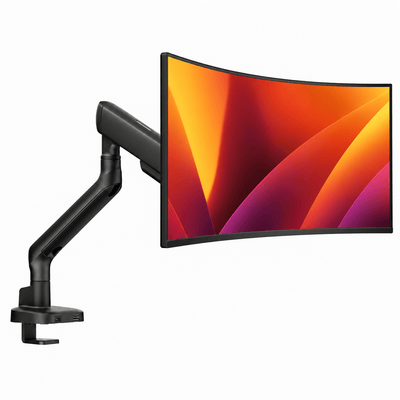
A monitor arm gives you control over height, depth, tilt, swivel, and rotation. That range matters because no two desks, chairs, or working styles are exactly alike. The right position generally places the top portion of the screen near eye level, with the display about an arm's length away. But the best setup is the one that lets you keep a relaxed, upright posture without forcing your body into a fixed position.
There is also the visual difference. Removing a bulky factory stand creates open space beneath the display and reduces the sense of clutter at the center of the desk. A clean floating-screen effect makes even a compact workspace feel more expansive. For design-conscious setups, that is not a minor detail. It is the point where ergonomic hardware becomes part of the room's aesthetic.
What to Look for Before You Buy
A premium monitor arm should feel stable, not merely adjustable. Its job is to hold an expensive display securely while allowing controlled movement. The details behind that experience are worth evaluating before you choose one.
Confirm monitor weight and screen size
Start with the monitor's actual weight without its stand, then compare it with the arm's supported weight range. This is more useful than screen size alone. Two displays with the same diagonal measurement can have very different weights, especially when one is ultrawide, curved, or built with a heavier panel.
Stay within the stated capacity rather than aiming for its upper limit. An arm operating comfortably within its range is more likely to hold its position smoothly. If your display is especially heavy, look for a heavy-duty design engineered for that load instead of treating a lightweight arm as a compromise.
Check VESA compatibility
Most modern monitors use a VESA mounting pattern, commonly 75 x 75 mm or 100 x 100 mm. Check the back of your display or its specifications before ordering. If the mounting points are recessed, confirm that the arm includes the hardware or spacers needed for a secure fit.
VESA compatibility is straightforward, but it is the detail that determines whether the monitor and arm work together at all. A polished desk setup begins with getting the fit right.
Choose the right desk attachment
Most desk-mounted arms attach with either a clamp or a grommet mount. A clamp is the practical choice for many desks because it attaches to the rear edge without drilling. It is also easier to relocate if you change desks or rearrange your room.
A grommet mount passes through an existing cable hole or a drilled opening in the desktop. It can create an especially clean installation and is useful when the desk edge is inaccessible. The trade-off is permanence. Measure the thickness of your desktop, inspect the underside for support beams or drawers, and make sure the mounting point has a solid, flat surface.
Think beyond the monitor
The arm should support how you use the desk, not just the display you own today. If you often work from a laptop beside a monitor, a laptop-monitor configuration may be the more efficient choice. If spreadsheets, editing timelines, coding, or market dashboards define your day, a double monitor mount can create a more capable visual field without consuming more desktop space.
Future flexibility has value. Still, buying more arm than you need is not always the answer. A single, well-positioned monitor can be a sharper setup than two screens arranged without purpose.
Position Your Screen for Real Work
An adjustable arm only improves comfort when it is adjusted with intention. Begin by sitting in your normal working position, not leaning forward to reach the keyboard or perched at the edge of the chair. Then bring the screen to you.
Set the display so your gaze meets the upper third of the screen without lifting your chin. If you wear progressive lenses or spend long periods reading dense documents, you may prefer the screen slightly lower. Tilt the panel enough to reduce glare, but avoid extreme angles that distort the image or encourage you to crane your neck.
Distance is equally personal. A larger 32-inch display may sit farther back than a 24-inch screen, while a high-resolution monitor can remain readable at greater distance. The goal is clear text without squinting and a posture that feels neutral rather than held in place.
For two monitors, decide which screen is primary. If one display gets most of your attention, center it in front of you and place the secondary screen beside it at a slight inward angle. If both screens are used equally, position the pair as a gentle curve around your natural line of sight. Avoid placing the split directly in the center if you constantly read across both panels.
Naše držáky na monitor


The Difference Is in the Motion
Not all monitor arms feel the same in use. Lower-cost mounts may technically lift and swivel, yet require two hands to move, drift downward under load, or introduce noticeable vibration when you type. Those frustrations make adjustability feel like a feature you stop using.
A thoughtfully engineered desk mount monitor arm should move with controlled resistance, remain steady once set, and keep cables contained as the screen changes position. Cable management is more than a finishing touch. It prevents dangling cords from undermining the clean look of an elevated display and protects the range of motion you paid for.
Material quality matters here as well. Metal construction, reliable tension mechanisms, and precise joints create the confidence to reposition a screen whenever the task changes. That confidence turns an arm from static hardware into an active part of the workspace.
When a Monitor Arm May Not Be the Right Choice
A desk-mounted solution is not automatic for every desk. A fragile glass desktop, a thin hollow-core surface, or a desk with an obstructed rear edge may need reinforcement or a different mounting approach. In those cases, forcing a clamp into place is not worth the risk.
It also depends on your monitor. Some all-in-one computers and displays without VESA mounting points require an adapter, while extremely large curved screens need an arm specifically rated for their weight and shape. Always account for the monitor's center of gravity, not just the number printed on the box.
If your screen never needs to move and your current stand already reaches the correct height, a monitor riser may be the simpler answer. But for desks that need flexibility, surface space, and a cleaner visual line, an arm offers far more control.
Build a Desk That Works as Well as It Looks
The best workspaces do not ask you to tolerate friction. They reduce it. Your screen is at the right height. Your cables have a place. The desktop is available for the tools that deserve to be there. Every element earns its space.
Alberenz designs workspace hardware around that standard: heavy-duty performance, clean lines, and the kind of adjustability that makes a desk feel tailored rather than temporary. A monitor arm is a focused upgrade, but its effect reaches across the entire setup.
Start with the screen you use most. Set it where your posture feels effortless, leave room for the work in front of you, and let the desk become a place that moves you forward.




