

A screen that sits a few inches too low can quietly shape an entire workday. You lean forward during calls, crane your neck while editing, and lose usable desk space to a bulky stand. The monitor mount versus wall mount decision is not just about where your display goes. It determines how your workspace moves, feels, and performs.
For most people building a refined, high-functioning desk, a monitor mount is the more adaptable choice. A wall mount can create an exceptionally clean visual statement, but it asks more of your room, your wall, and your commitment to one layout. The right option depends on how you work and how often your setup needs to work differently.
Monitor Mount Versus Wall Mount: The Core Difference
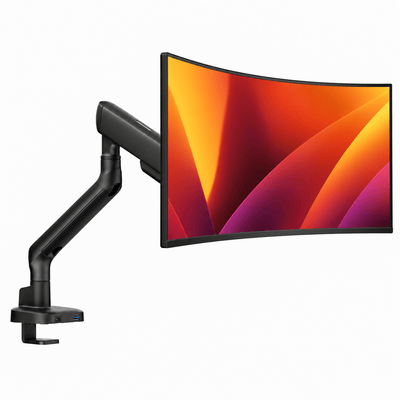
A monitor mount attaches directly to your desk, typically with a clamp or grommet installation. Its arm supports the display above the work surface and gives you control over height, distance, tilt, swivel, and often rotation. The screen becomes part of an adjustable workstation rather than a fixed fixture in the room.
A wall mount anchors to a wall behind the desk. It can be fixed, tilting, or articulated, depending on the model. When installed well, it creates a floating-screen effect and keeps every inch of the desktop clear. It is an excellent solution for permanent stations, reception areas, studio edit bays, or rooms where the desk is always in the same place.
The distinction is simple: desk-mounted arms optimize flexibility, while wall mounts prioritize permanence and architectural cleanliness.
Why a Monitor Mount Fits Modern Desk Setups
A premium monitor arm earns its place by making ergonomic adjustment effortless. Your display should sit near eye level, at a comfortable viewing distance, with a slight tilt that reduces glare. Those details are easy to refine when your screen can move with a light touch.
That matters when a single desk serves multiple modes of work. You may spend the morning in spreadsheets, shift to a standing position after lunch, then pull the display closer for detail-heavy creative work. A monitor mount supports these transitions without asking you to rearrange the room or reach for tools.
It also reclaims desk space in a more useful way than simply removing a monitor stand. The open area beneath the screen can hold a keyboard, notebook, docking station, or nothing at all. That visual breathing room makes a desk feel more intentional, especially in a small home office or apartment.
Better positioning for changing workdays
The strongest argument for a monitor arm is not that it moves. It is that you will actually use that movement. A screen can come forward when you need focus, swing aside when you sketch or write, and rotate vertically for code, documents, timelines, or long web pages.
This adjustability is especially valuable for hybrid workers. If your desk occasionally becomes a video-call station, a personal creative space, or a shared workspace, a desk mount lets the display adapt without compromising the rest of the setup.
A cleaner answer to cable management
Most quality monitor mounts route cables through or along the arm. Instead of seeing cords drop from the screen to the desk in plain view, you can guide power and display cables through a controlled path toward your dock or power source.
Cable management will not solve every source of clutter, but it creates order at the most visible point of the desk. Pair that with a compact dock and intentional accessory placement, and the result feels far more considered than a monitor balanced on its factory base.
When a Wall Mount Is the Better Choice
A wall mount makes sense when the screen should feel like part of the room rather than part of the desk. If you have a dedicated workstation with a stable desk position, solid wall structure, and no reason to frequently adjust monitor depth, a wall mount can look exceptionally polished.
It is also useful when desk edges cannot accept a clamp. Some desks have thick tops, unusual frames, glass surfaces, or rear panels that make a standard desk mount impractical. In those cases, wall mounting may be the cleanest route to an elevated screen.
For a display used mainly for viewing rather than active computer work, such as a dashboard, reference screen, or gaming display positioned across a room, a wall mount can be the obvious answer. You gain a clear surface below it and avoid the visual weight of an arm extending from the desk.
The trade-off is installation and commitment
Wall mounts require more planning than desk mounts. You need to identify appropriate studs or use hardware rated for the wall type and display weight. You also need to consider cable paths, outlet placement, and what happens if the desk moves later.
Even an articulating wall arm has limits. It may tilt, swivel, or extend, but its location is still fixed to the room. Change the desk orientation or move to another wall, and the installation no longer serves the setup. Removing it can also leave holes that need repair.
That does not make wall mounting a poor choice. It simply makes it a better choice for spaces with a settled layout and a long-term plan.
Monitortartóink

Desk Space Is Not the Only Space That Matters
Both options free up desktop real estate, but they use space differently. A wall mount clears the desk completely below the display. A monitor mount keeps the wall untouched and uses a small section of the desk edge for its clamp or grommet base.
The more relevant question is how much room your monitor needs to travel. If your desk sits close to the wall, an articulated desk arm may need clearance behind the display as it moves. A low-profile wall mount can keep the screen closer to the wall, which may be useful in narrow rooms.
On the other hand, a desk mount can make a shallow desk more comfortable by letting you push the screen back when needed or pull it forward to the ideal viewing distance. A fixed wall position does not offer the same freedom unless you choose a larger articulating wall arm, which adds cost and depth.
Weight Capacity and Desk Compatibility Matter
Do not choose a mount by appearance alone. Your monitor’s size is only part of the equation. Actual weight, VESA mounting pattern, screen curvature, and center of gravity all affect compatibility.
A large ultrawide or heavy professional display needs an arm designed to support it with confidence. A mount that is barely within its stated limit can sag, drift, or feel difficult to position. For dual-monitor setups, confirm the capacity for each display and account for the combined footprint of two screens moving on independent arms.
Desk construction matters just as much. A solid wood or sturdy laminate desktop is generally well suited to a clamp mount. Thin hollow-core surfaces, fragile glass, and desks with awkward reinforcement under the edge may require a grommet installation, a reinforcement plate, or a different solution altogether.
Alberenz designs its workspace hardware around this practical reality: the cleanest setup only feels premium when it is stable, properly matched, and built to carry the equipment you rely on every day.
Which Setup Should You Choose?
Choose a monitor mount if you want ergonomic range, an adaptable desk, and a setup that can change with your work. It is the natural fit for remote professionals, creatives, gamers, and anyone who values a desk that performs as precisely as it looks.
Choose a wall mount if your desk position is permanent, your wall can support a secure installation, and your priority is a floating, minimal visual effect. It works best when the screen is part of a fixed room layout rather than an active, adjustable workstation.
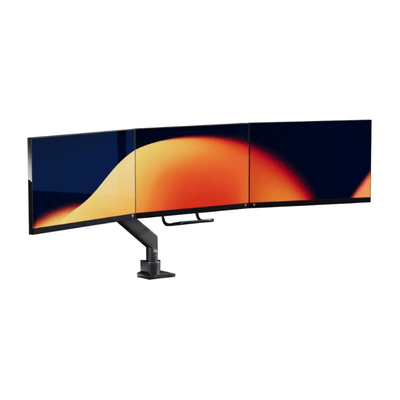
If you are building a dual-display setup, the same principle applies. Desk-mounted double monitor arms give you the freedom to align screens side by side, angle them inward, stack them, or create a primary-and-secondary layout. Wall mounting two displays can look dramatic, but alignment and future adjustments require far more planning.
Build for the Way You Actually Work
The most impressive desks are not the ones with the fewest visible objects. They are the ones where every object earns its position. Before choosing between a monitor mount and a wall mount, sit at your desk and notice what you reach for, where you lean, and when your screen gets in the way.
Your best setup should make focused work feel lighter from the first hour to the last. Choose the mount that gives your screen the right place to be, then give yourself room to do your best work.



