

A great desk does not happen by adding more things to it. It happens when every piece earns its place. This workspace accessories bundle guide is built for people who want a setup that looks considered, works harder, and feels better at the end of a long day.
The right bundle turns scattered upgrades into one complete system. Your screen sits where your eyes expect it. Your laptop supports a healthier posture. Cables disappear. The work surface feels open again. That is the difference between a desk full of gear and a workspace designed for performance.
Start With the Setup You Actually Use
Before choosing accessories, look at how you spend your desk time. A remote professional who works from one laptop has different needs than a designer moving between a large monitor and a tablet. A gamer may prioritize screen positioning and available surface area, while a hybrid worker may need a setup that can adapt quickly between focused work and video calls.
The goal is not to buy every accessory available. It is to remove the friction that slows you down. If you constantly look down at a laptop screen, start with a laptop mount. If your monitor occupies the center of your desk but still sits too low, a monitor arm or riser should lead the upgrade. If your desk feels visually crowded, cable management and a more intentional mounting system will make a larger impact than another desktop organizer.
Measure before you commit. Check desk depth, desktop thickness, monitor weight, VESA compatibility, laptop size, and the clearance behind your desk. Premium hardware should fit with precision, not become another compromise you work around.
The Core Pieces of a Workspace Accessories Bundle
A well-built bundle starts with screen support. Displays are the visual center of the workstation, and their position influences posture, comfort, usable space, and the entire look of the desk.
Monitor mounts create room to work
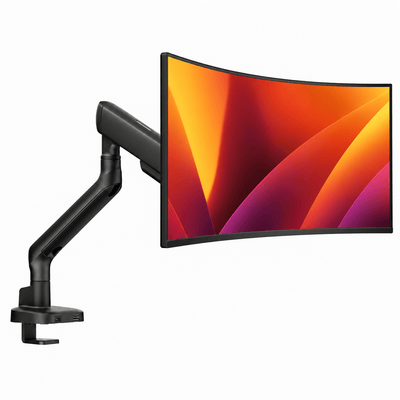
A monitor mount lifts your display off the desktop and puts it at a more natural viewing height. This can reduce the forward head posture that develops when a screen sits too low, while freeing up space beneath the monitor for a keyboard, notebook, charging station, or simply more visual breathing room.
For one-screen setups, a single monitor arm is often the cleanest choice. Choose a heavy-duty model rated for your monitor's actual weight, not just its screen size. Larger ultrawide monitors can be significantly heavier than standard displays, and a mount that is underbuilt for the job may sag, drift, or limit adjustment.
For two-screen workflows, a double monitor mount brings order to the center of the desk. It is ideal for analysts, developers, editors, traders, and anyone who keeps multiple windows open throughout the day. The trade-off is reach. Two large monitors need enough desk width and arm extension to sit comfortably without forcing you too close to the screens.
Laptop mounts complete a hybrid workstation
A laptop placed flat on a desk creates a predictable problem: your neck bends down to meet the display. A laptop mount raises the screen closer to eye level and creates a stronger ergonomic relationship between your laptop and external monitor.
If you use your laptop as a secondary display, a laptop-monitor mount is often the most refined answer. It brings both screens into a balanced visual line and keeps the work surface clear. This setup works especially well for remote professionals who need a desktop-grade workspace without giving up the flexibility of a portable computer.
A raised laptop typically requires an external keyboard and mouse. That is not a drawback so much as a necessary part of the system. Good ergonomics depend on both screen height and comfortable hand position. A bundle should support the full workflow, not solve one issue while creating another.
Monitor risers suit simpler desk layouts
A monitor riser offers a more grounded approach. It raises the display without the movement range of an arm and can be a strong fit for smaller screens, lighter setups, or desks where clamp mounting is not practical. It also introduces a clean architectural layer to the desktop.
The trade-off is adjustability. If you regularly switch between sitting and standing, share the desk, or need to fine-tune viewing angles, a monitor arm offers more flexibility. If you want a stable, minimal visual upgrade with less hardware visible, a riser may be the better choice.
How to Build a Bundle That Feels Intentional
The strongest workspace bundles follow a clear sequence: position the screens, define the input zone, then control the clutter. This order matters because it prevents accessories from becoming decoration instead of useful tools.
Start by setting your primary display directly in front of you. The top third of the screen should generally sit near eye level, though the ideal position depends on your vision, chair height, and preferred posture. Place a second monitor alongside it at a slight inward angle. Avoid arranging screens so wide that you spend the day repeatedly turning your neck.
Next, create a comfortable keyboard and mouse zone. Your shoulders should stay relaxed, your elbows should remain close to your sides, and your wrists should not need to bend sharply upward. Once this area is established, you can see how much desktop space is truly available for a notebook, speakers, a dock, or personal items.
Then deal with cables. A clean desk is not just about appearance. Loose cords catch, pull, collect dust, and make every adjustment feel less refined. Use the routing built into your monitor or laptop mount where available, and keep power and charging hardware contained behind or below the desk. The result is a setup that looks lighter, even when it is supporting serious equipment.
Our monitor mounts


Choose Quality Where Movement and Weight Matter
Not every accessory needs the same level of investment. A pen tray is easy to replace. The hardware supporting a high-value monitor above your desk deserves more scrutiny.
Look for materials that match the demands of daily adjustment. A premium mount should hold position reliably, move with control, and remain stable when you type, reposition a screen, or raise a sit-stand desk. Finishes matter too. Clean lines, durable coatings, and thoughtful cable routing keep the workspace looking polished long after the first setup photo.
Compatibility is equally important. Verify the mount's weight range, VESA pattern, clamp or grommet requirements, and available height adjustment. If your desk has a thick edge, a crossbar, a glass surface, or limited rear clearance, the installation method may determine which bundle will work best.
Alberenz designs its workspace hardware around this balance of heavy-duty performance and clean, modern form. The right bundle should feel substantial when you adjust it and nearly disappear visually once your desk is in use.
Three Bundle Directions for Different Workstyles
The focused laptop setup begins with a laptop mount, external keyboard, mouse, and cable control. It is ideal for smaller desks, apartments, and professionals who want a more ergonomic home base without adding a large monitor. Keep the visual field simple and leave open space around the keyboard.
The dual-screen productivity setup centers on a double monitor mount, with an optional laptop positioned below or alongside the displays. This is the choice for deep multitasking and demanding screen-based work. Prioritize monitor alignment and desk depth so the setup feels centered rather than crowded.
The hybrid creator setup pairs a primary monitor arm with a laptop-monitor mount. It gives you a large main display for detailed work and a raised laptop for communication, reference material, or timeline tools. This configuration has more components, but it can make one desk serve as an office, studio, and editing station without sacrificing order.
Avoid the Most Common Bundle Mistakes
The first mistake is choosing by appearance alone. A minimal setup can still be uncomfortable if the screen is too low or too far away. Design should support function, not cover for poor positioning.
The second is buying accessories separately without a plan. You may end up with mismatched finishes, conflicting clamp positions, and cables that become harder to hide with every new addition. Bundles work best when the pieces are selected to share the same visual language and physical footprint.
The third is overlooking future needs. If you expect to add a second monitor, replace your laptop, or move to a sit-stand desk, choose mounting hardware with enough range and capacity to grow with you. Buying once is often more economical than repeatedly replacing entry-level equipment.
A workspace should make focused work feel more natural, not demand more attention from you. Choose the accessories that solve the strain, clutter, or limitations you feel every day, then give each one a deliberate place. When the desk is built with that level of purpose, better work has room to happen.




