

A monitor mount can look simple from across the desk: an arm, a clamp, a screen floating exactly where you want it. But the reason why premium monitor mounts last longer is rarely visible in a product photo. It lives inside the joints, the tension system, the metal thickness, and the discipline behind the load rating.
For anyone who spends long days at a desk, a mount is not a minor accessory. It holds one of your most-used tools at eye level, clears space beneath it, and helps shape a setup that feels focused rather than improvised. A premium mount is built to keep doing that job after thousands of adjustments, not just through the first few months of ownership.
Premium Monitor Mounts Start With Better Materials
The fastest way to make a monitor arm feel inexpensive is to use lightweight components where strength matters most. Thin steel, lower-grade aluminum, plastic-heavy joints, and undersized hardware may reduce production costs, but they also create more flex under load. Over time, that flex becomes screen drift, loosened connections, and a desk setup that never quite stays where you put it.
Premium monitor mounts use stronger structural materials at the points carrying the most force. That usually means substantial metal arm sections, reinforced desk clamps, durable VESA plates, and hardware designed to resist repeated tightening and movement. The goal is not simply to hold a monitor once. It is to maintain alignment day after day.
Material quality also affects how a mount feels in use. A well-built arm moves with control. It does not rattle when you type, wobble when you touch the display, or feel like it needs to be handled carefully. That sense of stability is more than a luxury. It protects your screen, your desk, and the clean visual standard you expect from a considered workspace.
The Real Difference Is Inside the Moving Parts
A fixed monitor riser has one job. An adjustable monitor arm has several: lift, lower, extend, retract, rotate, tilt, and often pivot between landscape and portrait. Every one of those movements introduces wear.
This is where the difference between a basic arm and a premium model becomes clear. Quality mounts use engineered pivot points, controlled friction mechanisms, and gas springs or mechanical tension systems selected for consistent performance. The arm should hold its position without sudden drops, stiff resistance, or gradual sagging.
Tension Systems Are Built for Repetition
The tension mechanism is the working core of an adjustable arm. In lower-cost mounts, it can lose calibration as the internal spring, cylinder, or joint wears. A monitor that once stayed at eye level may slowly begin to sink. Users often compensate by overtightening adjustment screws, which can accelerate wear or make future adjustments difficult.
Premium designs are made for repeated cycles within a stated weight range. They are also easier to fine-tune as your setup changes. That matters when replacing a 24-inch monitor with a larger ultrawide display, or when switching between work modes throughout the week.
Not every user needs constant motion. If your screen stays in one position for years, a simpler mount may be enough. But if you regularly share your screen, alternate between sitting and standing, use portrait orientation for research, or refine your setup often, higher-quality moving components earn their place quickly.
Joints That Hold Their Position Protect Your Workflow
A monitor arm should not ask for attention once it is dialed in. Premium joints are designed to resist the slow loosening caused by gravity, vibration, and daily adjustments. This is especially valuable with heavier displays, dual-monitor configurations, and large screens that place greater leverage on the arm.
The benefit is practical and visual. Your monitor remains level. Your screen edges stay aligned. Your desk does not develop the slightly off-center, constantly adjusted look that makes an otherwise polished workspace feel unfinished.
Load Ratings Are More Than a Number
A stated weight capacity is one of the most useful specifications on a monitor mount, but it only helps when it is honest and properly engineered. Premium manufacturers design around real-world forces, not just a static screen placed at the shortest possible distance from the base.
An extended arm carrying a monitor creates leverage. The farther the display sits from the mounting point, the more force the arm, joints, clamp, and desk surface must manage. A quality mount accounts for that reality with an appropriate safety margin and a structure that remains stable across its intended range of motion.
Before choosing a mount, check the actual weight of your monitor without its factory stand. Then compare it with the mount's supported range, including minimum and maximum capacity where applicable. A monitor that sits near the center of a mount's range will generally give the tension system a more comfortable working life than one pushed to the upper limit.
Screen size matters, but weight matters more. A thin 34-inch ultrawide may be easier for an arm to support than a compact professional display with heavier internal components. Curved screens can also project weight farther forward, increasing leverage. The right mount is not the one with the biggest number on the box. It is the one engineered for your specific display and how you plan to position it.
Our monitor mounts
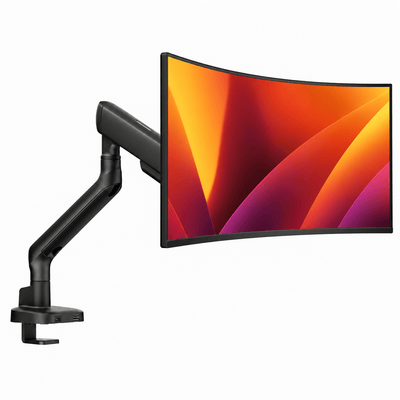


The Clamp and Base Carry the Whole Setup
A monitor arm is only as secure as the part connected to the desk. Premium mounts treat the clamp, grommet base, and contact surfaces as structural components, not afterthoughts.
A strong desk clamp spreads pressure across a wider area and uses durable threading that tolerates installation, adjustment, and removal without stripping. Protective pads help preserve the desk finish while improving grip. Grommet mounting can provide an exceptionally clean, secure result when your desktop has a suitable opening and you want the most integrated look.
Your desk itself deserves consideration. Solid wood, quality laminate, and sturdy desktop construction generally provide a more dependable mounting surface than hollow-core or fragile glass tops. Even an excellent mount cannot correct an unstable desk. If the desktop flexes heavily, the monitor may still shake when you type.
This is also why premium hardware is worth considering for multi-screen setups. A double monitor mount concentrates meaningful weight at a single location. When the base, pole, and clamp are engineered as a system, the result feels composed instead of precarious.
Finishes and Cable Management Help Mounts Age Well
Durability is not only about whether a mount holds a screen. It is also about whether it still looks appropriate in a workspace you are proud to use.
Premium powder-coated or carefully finished metal surfaces resist scratches, fingerprints, and everyday wear better than thin painted coatings. The difference becomes noticeable around adjustment points, cable channels, and clamps, where hands and tools make frequent contact. A quality finish keeps the mount looking intentional rather than worn down.
Integrated cable management plays a role, too. Loose cables can snag when an arm moves, pull against ports, or create clutter that makes a clean desk feel busy. Channels and covers route cables along the arm, reducing strain while preserving the minimal look that makes a mounted display so compelling in the first place.
Why Premium Monitor Mounts Last Longer in Daily Use
The most convincing test of a mount is not installation day. It is month eighteen, after hundreds of small adjustments, a new monitor, a few cable swaps, and countless hours of typing beneath it.
Premium monitor mounts are designed around that long view. Their stronger materials resist flex. Their tension systems are built for movement. Their clamps manage load more confidently. Their finishes and cable routing preserve the refined look of your desk after the initial setup excitement has passed.
That does not mean the most expensive option is always the right one. A single lightweight monitor in a fixed position may not require the same level of engineering as a large ultrawide, a creator's dual-display layout, or a shared home office where screens move constantly. The right choice depends on monitor weight, adjustment habits, desk construction, and how long you expect the setup to serve you.
For a workspace that works as hard as you do, longevity is a form of design. Choose a mount with the strength to disappear into your routine, so your attention stays on the work, the ideas, and the screen positioned exactly where it belongs.




