

A monitor that sits two inches too low can turn a refined desk into a daily source of tension. The monitor arm vs stand decision is not just about where your screen rests. It shapes your posture, your usable desk space, and the visual calm of the place where you do your best work.
For some setups, a stand is the clean, uncomplicated answer. For others, a monitor arm is the upgrade that makes the whole desk feel more capable. The right choice depends on your screen, your work style, and how much flexibility you expect from your workspace.
Monitor Arm vs Stand: The Real Difference
A monitor stand supports your display from below. It may be the factory stand included with your monitor or a separate riser that elevates it to a more comfortable height. Its appeal is straightforward: place it on the desk, position the monitor, and get to work.
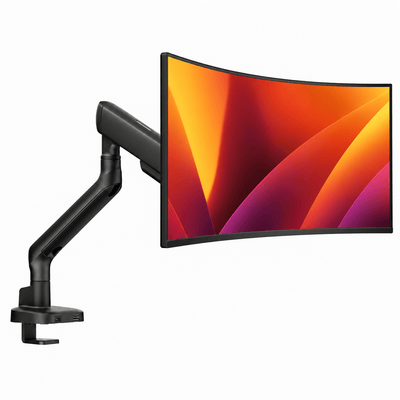
A monitor arm attaches to the back of a compatible display using a VESA mounting plate, then anchors to the desk through a clamp or grommet mount. It holds the screen above the desktop and allows movement through its articulated joints.
That difference changes the experience of the desk. A stand creates a fixed home for the monitor. An arm gives the monitor a working range. You can raise it, bring it closer, push it back, rotate it for portrait viewing, or move it aside when your desk needs to serve a different purpose.
Neither is automatically better. A stand favors simplicity and immediate stability. An arm favors adaptability, open space, and a more tailored ergonomic position.
When a Monitor Stand Makes Sense
A stand is a strong choice when your desk setup is stable and your screen rarely needs to move. If you work from one position, use a single monitor, and already have a desk with enough surface area, a well-designed stand can provide a clean, dependable foundation.
It is also the easier option for monitors that do not support VESA mounting. Some displays have proprietary mounting systems or no mounting holes at all, which limits arm compatibility. Before buying an arm, always confirm that your monitor supports the correct VESA pattern and falls within the mount's weight range.
A quality monitor riser can improve the look of a basic factory stand, too. Raising the screen to eye level reduces the tendency to tilt your head downward, while the platform below creates a natural place to store a keyboard, notebook, or small accessories when they are not in use.
The trade-off is footprint. Even a slim stand takes up valuable desk real estate directly beneath the screen. It can also limit how far back you can position the monitor, especially on shallow desks. If every inch matters, a stand may begin to feel like the largest object on the surface rather than a supporting part of the setup.
Why a Monitor Arm Changes the Desk
A monitor arm creates space where a stand would normally sit. By lifting the display off the desktop, it clears room for a larger keyboard, drawing tablet, laptop, speakers, or simply a more open visual field. That is especially valuable on compact desks, where organization has a direct effect on how the space feels.
Its bigger advantage is adjustment. Your ideal monitor height is not a universal measurement. It depends on your chair height, torso length, desk depth, screen size, and whether you wear progressive lenses. With an arm, you can fine-tune the screen until the top third of the display sits near or slightly below eye level, rather than adapting your body to a fixed stand.
This is useful for anyone who shifts between tasks. A designer may pull a display closer for detail work. A gamer may center the screen precisely for an immersive session. A remote professional can move a monitor aside to create room for handwritten notes or bring it forward for a video call. The desk becomes more responsive to the work instead of dictating it.
A premium arm also makes cable management easier. Routing power and display cables along the arm removes the loose, hanging lines that can make even an expensive setup look unfinished. The effect is subtle but significant: fewer visual interruptions, a cleaner desktop, and a workspace that feels intentional from every angle.
Våra monitorarmar


Ergonomics: Movement Is the Advantage
Good ergonomics is not simply about placing a monitor at one textbook-perfect height. It is about making it easy to maintain a comfortable position throughout the day. A monitor arm is particularly effective here because it supports small adjustments without requiring books, stacked risers, or a full desk reset.
If you alternate between sitting and standing, an arm can make the transition more practical. A fixed stand may leave the screen too low once the desk rises. An adjustable arm can follow your working position, helping keep the display within a comfortable viewing zone.
That said, an arm cannot solve every ergonomic issue on its own. If your chair lacks support, your desk is too high, or your keyboard position forces your shoulders upward, moving the monitor will only address part of the problem. Think of the screen as one component in a considered setup, alongside chair height, desk depth, keyboard placement, and lighting.
For a single-user desk, take a few minutes to set the screen where it feels natural, not merely where it looks centered. For shared workspaces or hot desks, an arm offers even more value because each person can quickly reset the monitor to fit their body.
Stability, Weight Capacity, and Desk Compatibility
The best monitor arm should feel solid, not delicate. High-quality arms are engineered to carry specific screen weights and sizes while holding their position through repeated adjustments. A properly matched arm keeps the display steady during typing and provides controlled movement when you want to reposition it.
Weight capacity matters more than many buyers expect. A large ultrawide monitor, curved display, or professional-grade screen can be substantially heavier than a standard office monitor. Check the monitor's weight without its factory stand, then choose an arm rated to support that weight comfortably. It is wiser to have capacity to spare than to operate at the upper limit.
Your desk deserves the same attention. Clamp-mounted arms work best on a sturdy desktop with a suitable edge and enough thickness for the clamp. Glass, hollow-core, or unusually thin desks may require a reinforcement plate, a grommet installation, or a different setup entirely. A stable desk and a well-built mount work as a system.
A stand has a simpler compatibility profile. If the desktop is level and strong enough to support the monitor, it will usually work. That simplicity can be reassuring, but it does not offer the same degree of placement control.
Style and Desk Space Are Connected
The choice between an arm and a stand often comes down to the kind of workspace you want to see every morning. A monitor stand can look grounded and architectural, particularly when it complements the materials and finish of the desk. It gives the screen a deliberate, anchored presence.
A monitor arm delivers a more floating, minimal look. The display appears to hover above the desk, which can make even a small workspace feel lighter and more spacious. It is a natural fit for clean desk setups where every object has a purpose and cables stay out of sight.
For dual monitors, the visual and functional case for arms becomes stronger. Two factory stands consume a wide portion of the desktop and may make precise alignment difficult. A double monitor mount brings both displays into a balanced arrangement while preserving room below them. If you work with timelines, dashboards, code, or multiple creative applications, that extra space can change the flow of the day.
Choosing a Monitor Arm vs Stand for Your Setup
Choose a monitor stand if you want simple installation, your screen does not support VESA mounting, or your monitor position is already comfortable and unlikely to change. It is an effective solution for stable, single-screen workspaces with enough available surface area.
Choose a monitor arm if you want more room, better height and depth adjustment, cleaner cable routing, or the ability to change your setup as your work changes. It is especially compelling for shallow desks, sit-stand desks, dual-monitor layouts, laptop-and-monitor combinations, and anyone who values a more refined visual finish.
A monitor arm is also a long-term workspace investment. Screens may change, projects may demand a second display, and a dining table may eventually become a dedicated office. A thoughtfully designed mount gives your setup room to evolve without forcing you to rebuild it from scratch.
The best choice is the one that removes friction from your day. If your screen should stay exactly where it is, give it a stable, elevated foundation. If your work asks the desk to do more, let the monitor move with you and keep the surface below clear for what matters next.




