

A compact desk can feel crowded long before it is truly full. The problem is usually vertical space: a monitor sits too low, a laptop takes over the surface, and the tools you use every day compete for the same few inches. The right desk riser for small spaces changes that equation. It creates a more comfortable viewing height while giving your setup a cleaner, more intentional footprint.
For a refined workspace, the goal is not to add more furniture. It is to make every element earn its place. A well-chosen riser can lift your screen, organize the visual field, and create room beneath or around your display for the essentials that keep work moving.
Why a Desk Riser Matters in a Compact Setup
Small desks make poor ergonomics more obvious. When a screen is too low, you may lean forward, round your shoulders, or angle your neck down for hours at a time. That posture can make even a well-designed chair feel ineffective. Raising the display closer to eye level helps create a more natural viewing position and gives the rest of your setup a clearer hierarchy.
There is also a visual benefit. A monitor placed directly on a desk can make the entire surface feel flat and congested. Elevating it introduces structure. The space under the screen becomes available for a keyboard, notebook, dock, or a few carefully selected accessories. Instead of spreading outward, your setup begins to work upward.
That said, a riser is not automatically the best answer for every desk. If you need frequent, wide-ranging height changes or want to position multiple displays independently, a monitor mount may offer more flexibility. A riser is the stronger choice when you want a stable, design-forward elevation solution with minimal installation and a clean, grounded look.
Choosing a Desk Riser for Small Spaces
The best compact setup starts with proportion. A desk riser should improve the way you use the desk, not become another oversized object sitting on it. Before choosing one, measure the available width and depth of your working area, then account for the full path of your keyboard, mouse, laptop, and monitor stand.
Start With Your Display Height
Your primary display should generally sit with the top portion of the screen near eye level when you are seated comfortably. The right height depends on your chair, torso length, monitor size, and whether you wear progressive lenses, so there is no single measurement that works for everyone.
A fixed-height riser is ideal if your preferred screen position is already clear. It offers a crisp, stable solution with no extra mechanisms or visual noise. If multiple people use the desk, or your task changes throughout the day, adjustable hardware can be worth the additional complexity.
For laptop users, remember that lifting the laptop screen also lifts the keyboard. A laptop riser works best when paired with an external keyboard and mouse. This creates a proper screen height without forcing your arms into an awkward elevated typing position.
Measure the Footprint, Not Just the Screen
A riser that fits the width of your monitor can still feel too large if it extends far into the desk. Depth matters most on desks under 24 inches deep, where every inch affects your keyboard and mouse placement.
Look at the total surface area your monitor occupies, including its base, then consider what you want to place below it. A narrow riser can create a useful shelf without pushing the keyboard too close to the desk edge. A wider platform may suit a dual-purpose station with a monitor, laptop, and charging accessories, but only if the desk has enough horizontal room to keep each item usable.
Keep clearance in mind as well. The space beneath a riser is only valuable if it fits something you genuinely use. If your keyboard is tall, your notebook stack is thick, or a docking station has upward-facing cables, a low platform may create more friction than function.
Choose Materials That Feel Permanent
On a small desk, every object is highly visible. Flimsy acrylic, thin particleboard, or lightweight plastic can make an otherwise polished setup feel temporary. Premium materials and a stable construction do more than support equipment safely. They give the workspace visual confidence.
A metal riser with a durable finish often suits modern workstations because it pairs naturally with monitor arms, laptop stands, and other desk hardware. Wood can bring warmth and contrast, especially in a home office, but it should be substantial enough to resist flexing and wear. The best choice depends on the rest of your setup, from the desk surface to the finish of your keyboard and monitor.
Weight capacity is equally practical. A riser should support your monitor with room to spare, not simply meet its listed weight. This matters more with ultrawide displays, larger screens, and monitors with heavy bases. A solid platform remains steady when you adjust cables, move the display, or clean the desk.
Build Vertical Space Without Building Clutter
A compact workstation feels premium when it has clear zones. Your screen belongs in the visual center. Your input devices should remain easy to reach. Accessories need a home that does not interrupt the work surface.
A riser can define these zones elegantly. Place the monitor on top, store a slim keyboard underneath when it is not in use, and position a charging hub or notebook beside it. The result is not just more room. It is less decision-making every time you sit down.
Cable management deserves the same attention. A raised monitor often reveals cables that were previously hidden behind the screen, so plan for their route before committing to the layout. Use the rear edge of the riser and the back of the desk to guide cables downward. Keep power bricks off the desktop when possible, and avoid stacking adapters in the shelf area where they create visual clutter.
If your desk sits in a bedroom, studio, or shared living area, restraint matters even more. Leave some negative space around the riser. A compact desk does not need to display every device you own. One elevated monitor, a focused set of tools, and a clean cable path can make a small work zone feel composed rather than compromised.
Onze monitorbeugels


When a Monitor Arm Is the Better Upgrade
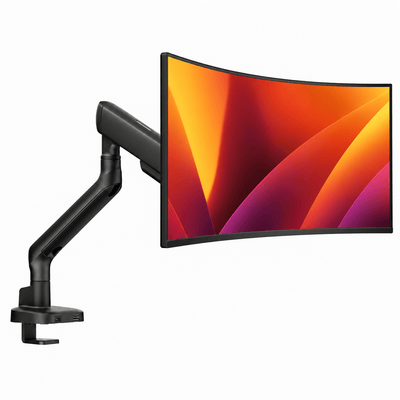
A desk riser creates stable elevation, but it uses part of the desktop to do it. If surface area is extremely limited, a clamp-mounted monitor arm can free more room by lifting the display entirely off the desk. It also gives you greater control over height, distance, tilt, and rotation.
This is especially useful for creatives who shift between detailed work and broader viewing, professionals who need their monitor pulled forward for focused tasks, or gamers who want a precise screen position. A double monitor mount can be even more transformative on a narrow desk, provided the desk edge is compatible with a clamp and the displays are within the arm's capacity.
The trade-off is that monitor mounts require more planning. You need to check desk thickness, clearance behind the desk, monitor VESA compatibility, and cable routing. A riser is simpler and often better suited to renters, occasional setups, and people who want a polished upgrade without installation.
For many small spaces, the strongest approach is a hybrid one: use a monitor arm for the primary screen, then add a compact riser for a laptop, speakers, or a controlled accessory zone. This keeps the desktop open while preserving the layered look that makes a setup feel finished.
A Better Setup Starts With Fewer, Better Pieces
Do not choose a riser only because it promises more storage. Choose it because it supports the way you work. If it gives your display the right height, clears your active surface, and matches the visual standard of the rest of your workspace, it is doing its job.
Alberenz approaches workspace hardware with that same standard: performance first, then the clean, elevated finish that makes a desk feel worth returning to. A compact workspace should not feel like a compromise. With the right screen elevation and a deliberate layout, even a small desk can hold its own as a focused, high-performing place to work.
Before making the change, clear your desk completely and rebuild it around the tasks you perform most. The best riser is the one that leaves your hands, eyes, and attention with more room to do their best work.




