Trovare il giusto supporto per monitor

Scritto da Bas Hellendoorn 

Pubblicato il 15 settembre 2025

Chi passa diverse ore al giorno seduto a una scrivania sa quanto sia essenziale avere una postazione di lavoro ergonomica. Un'altezza dello schermo sbagliata o una scrivania disordinata possono sembrare innocui, ma a lungo termine portano a disturbi fisici (dolore al collo, mal di schiena) e a una minore produttività.


Un supporto per monitor non è un semplice accessorio; è la soluzione intelligente e pratica che trasforma la tua postazione di lavoro. Rende il lavoro più salutare, confortevole ed efficiente.

Perché un braccio per monitor è indispensabile per la tua salute

Uno schermo che di default si trova sulla tua scrivania è raramente adattato alla tua postura unica. Spesso è troppo basso, costringendoti a guardare innaturalmente verso il basso, oppure troppo lontano. Questo affatica il collo, le spalle e la schiena, e non solo lo senti dopo una lunga giornata di lavoro, ma lo noti anche nel tuo livello di energia e concentrazione.


Un braccio per monitor di qualità o un braccio per monitor per più schermi di Alberenz ti offre la massima libertà:

  •  Altezza perfetta degli occhi: Imposti il tuo schermo esattamente all’altezza degli occhi, assumendo così una postura naturale e dritta.
  • Piena flessibilità: Puoi ruotare, inclinare e regolare l’altezza dello schermo senza limiti. Questo rende il passaggio tra seduto e in piedi (con una scrivania regolabile) senza sforzo.
  • Benefici per la salute: Il risultato diretto? Meno dolori a collo e schiena, maggiore concentrazione e la possibilità di lavorare comodamente più a lungo.

How monitor height influences posture and daily strain

Your screen height affects how you hold your head, shoulders and upper back throughout the day. When the monitor sits too low, your neck tilts forward, which increases pressure on your spine and makes your muscles work harder. Raising the screen to eye level helps keep your posture neutral, reducing unnecessary strain. This simple adjustment can prevent headaches, tension and long term discomfort.


Even small changes in height can significantly improve how comfortable your setup feels during long work sessions. Over time, this reduces the risk of developing repetitive stress issues that often come from poor desk ergonomics. A monitor arm makes it easy to fine tune these adjustments without disrupting your workflow.

The long term health benefits of using monitor arms

Using a monitor arm helps support better posture throughout the entire workday, which reduces long term strain on your muscles and joints. When your screen stays at the right height, your body does not have to compensate with forced or tightened positions. This helps decrease the likelihood of developing chronic discomfort. Over time, this consistent support enhances daily comfort.


Proper screen positioning also helps improve your breathing and circulation because you are not leaning forward or compressing your chest. This makes it easier to stay focused during long tasks. A well adjusted setup contributes positively to both comfort and energy levels.

Vantaggio extra: tranquillità e spazio sulla tua scrivania

Oltre ai vantaggi ergonomici, un supporto per monitor offre un vantaggio estetico e pratico immediato: risparmio di spazio.


Poiché lo schermo letteralmente 'fluttua' sopra la scrivania, liberi lo spazio dove normalmente si trova la base del monitor. Questo crea spazio extra per:

  • La tua tastiera e il mouse.
  • Appunti o documenti.
  • Un look pulito e minimalista.

Combina questo con la gestione integrata dei cavi della maggior parte dei bracci Alberenz, e la tua scrivania non sarà solo ordinata, ma darà anche tranquillità alla tua mente. Una scrivania ordinata porta infatti a una mente ordinata.

How cable management supports a clean and organized desk

Good cable management keeps your cables from cluttering the desk or hanging loosely in view. When the wires are neatly routed through the arm, your workspace looks cleaner and more streamlined. This makes it easier to concentrate because there are fewer visual distractions around your monitor. A tidy setup also reflects a more professional and well considered workspace.


A clean desk is easier to maintain over time because you do not have to constantly reposition or untangle cables. This helps maintain a sense of calm and reduces the time spent on small adjustments throughout the day. With a proper cable system, your workspace stays organized with minimal effort.

Why a floating screen helps improve daily focus

A floating screen creates a more open and distraction free workspace by reducing physical clutter on the desk surface. This helps your eyes and mind stay focused on the task at hand rather than the surrounding objects. When your workspace looks intentional and organized, it becomes easier to maintain concentration during long projects. This visual simplicity supports a smoother workflow.


The elevated position of the monitor also contributes to better posture, encouraging a more natural line of sight. This reduces unnecessary head movements that can interrupt focus. Over time, these small improvements help create a more efficient and enjoyable work routine.

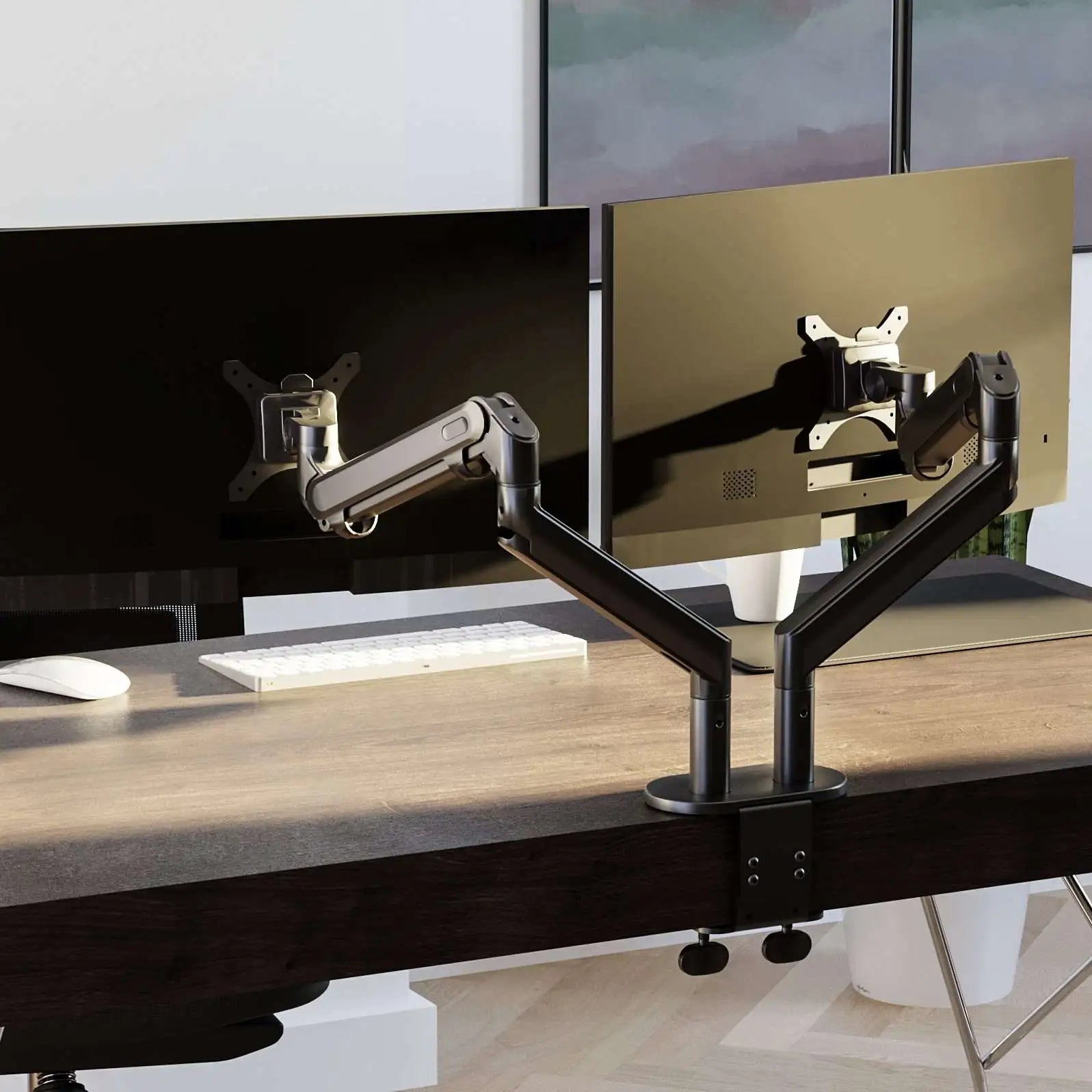
Alberenz® Braccio Doppio per Monitor con Molla a Gas Grigio Scuro

119,00 €
139,00 €

Il Alberenz® Braccio Doppio per Monitor è realizzato con un meccanismo a molla a gas ad alta precisione, che ti permette di regolare facilmente l'altezza e la posizione dei tuoi monitor. Questo design innovativo aiuta a mantenere una postura ergonomica posizionando gli schermi a altezza degli occhi, riducendo l'affaticamento di collo e schiena e migliorando la produttività. La struttura robusta garantisce prestazioni affidabili, mentre la finitura grigio scuro aggiunge un tocco moderno ed elegante a qualsiasi spazio di lavoro.

Vantaggi Principali:

  • Supporto Ergonomico: Mantiene i monitor all'altezza ottimale degli occhi per prevenire fastidi a collo e schiena.

  • Regolazione Fluida: Il sistema a molla a gas consente regolazioni di altezza e angolazione senza sforzo.

  • Angoli di Visione Flessibili: Inclina, ruota e gira i tuoi monitor per la prospettiva perfetta.

  • Ampia Compatibilità: Adatto a monitor da da 17 a 27 pollici e supporta fino a 8 kg per braccio.

  • Installazione Facile: Installazione semplice con morsetto sicuro o montaggio a passacavo.

Trasforma la tua scrivania in un spazio di lavoro ergonomico ad alte prestazioni con il Alberenz® Braccio Doppio per Monitor.

Quantità

Quale tipo di supporto per monitor fa per te?

Non tutte le postazioni di lavoro sono uguali. La soluzione ideale per chi lavora da casa con uno schermo è diversa da quella per un grafico con una configurazione multi-monitor.


1. La Scelta Più Popolare: Il Braccio Monitor con Morsetto da Scrivania

Questa è l'opzione più flessibile e comune. Fissi il braccio facilmente al bordo della scrivania, senza forare. Sono perfetti per:

  • Monitor Singoli: I nostri bracci per monitor singoli offrono la migliore flessibilità e stabilità per l'uso quotidiano.
  • Doppi Monitor: Lavori con due schermi? I supporti per più monitor mantengono i tuoi monitor perfettamente alla stessa altezza e distanza.
  • Laptop & Monitor: Una soluzione intelligente è il braccio per laptop e monitor che porta il tuo laptop all'altezza degli occhi, accanto a uno schermo aggiuntivo.

2. Il Salvaspazio: Il Supporto a Parete

La tua scrivania è contro una parete o desideri un look ultra minimalista e ordinato? Il supporto a parete è ideale per risparmiare il massimo spazio di lavoro. Anche se meno flessibile di un braccio con morsetto, garantisce l'aspetto più ordinato possibile.


3. La Base: Supporti per monitor o Rialzi

Questi sollevano il tuo schermo, il che è già un miglioramento, ma offrono poche o nessuna possibilità di ruotare, inclinare o regolare l'altezza durante la giornata. Sono una soluzione economica e temporanea, ma per una vera ergonomia un braccio monitor regolabile è il miglior investimento.

When dual or triple monitor arms improve professional workflows

Dual monitor setups help you keep reference materials and active tasks visible at the same time. This reduces the need to switch between windows and creates a smoother workflow. A triple screen setup offers even more space for detailed work or content heavy tasks. These configurations support professionals who rely on multiple applications open simultaneously.


Professionals working in design, programming or data analysis often benefit most from multi screen layouts. It lets them organize their tools and information without disrupting concentration. The right monitor arm setup helps maintain comfort while managing complex tasks.

Fare la scelta giusta: a cosa prestare attenzione

Un supporto per monitor è un investimento a lungo termine. Presta quindi attenzione a queste specifiche cruciali:


1. Dimensioni, Peso e Capacità di carico (Cruciale!)

Questo è il fattore più importante. Un monitor leggero da 24 pollici è sufficiente con un braccio standard, ma per un ultrawide da 34 pollici pesante o uno schermo grande curvo hai bisogno di una struttura robusta con un'elevata capacità di carico. Controlla sempre il peso che il braccio può sostenere e confrontalo con il peso del tuo monitor.


2. Compatibilità VESA

Lo standard VESA garantisce che il tuo schermo si adatti a quasi tutti i supporti universali. Questi sono i quattro fori per le viti sul retro del monitor (di solito 75x75 mm o 100x100 mm). Controlla sempre questa misura prima di ordinare.


3. Tipo di montaggio

Morsetto da scrivania (C-clamp): Il più flessibile, non richiede forature. Ideale per la maggior parte delle scrivanie.

Passacavo (Grommet): Fissato tramite un foro nel piano o attraverso un'apertura per cavi esistente. Offre maggiore stabilità, ideale per schermi pesanti o doppi.

Montaggio a parete: Per il massimo risparmio di spazio.


4. Esigenze speciali (Gamers & Designer)

Gamers: Hanno bisogno di stabilità e di un braccio che possa sostenere il peso di schermi grandi.

Graphic Designer: È fondamentale che lo schermo possa essere ruotato verticalmente (modalità ritratto) per valutare documenti lunghi o progetti. Assicurati che il braccio offra questa rotazione (pivot).

How a wall monitor mount creates a minimal workspace setup

A wall mounted monitor keeps the desk completely clear of hardware and allows the screen to float in an open space. This creates a clean and modern appearance that works well in minimalist interiors. It is a good option for small desks or work areas where every centimeter of space matters. The result is a workspace that feels uncluttered and open.


The stability of wall mounting also makes it suitable for larger or heavier screens. It keeps the monitor in a fixed position while maintaining a clean aesthetic. This approach allows you to build a workspace that looks intentional and reduces distractions.

Choosing the best monitor arm for your screen

Un supporto per monitor è la chiave per trasformare una postazione standard in una configurazione professionale, ergonomica ed elegante. È un investimento intelligente che si ripaga con meno disturbi fisici, più concentrazione e una maggiore produttività.


Che tu voglia ottimizzare la tua postazione di lavoro a casa, arredare un intero ufficio o cerchi la configurazione gaming definitiva: da Alberenz trovi il supporto perfetto per la tua situazione.


👉 Pronto a lavorare in modo più sano e confortevole?


Scopri la collezione di supporti per monitor di Alberenz e trasforma la tua scrivania in un luogo sano, elegante e produttivo.

Supporting large monitors with the correct weight capacity

Large monitors require a monitor arm designed to carry additional weight while maintaining smooth adjustability. The correct weight rating ensures the screen stays at the intended height without drifting. This allows you to position the monitor confidently at any angle or distance. By choosing the proper support, you protect both your equipment and your workspace.


Ultrawide or curved screens benefit most from strong arms that keep the monitor steady during movement. A reliable arm ensures long term performance and reduces the need for frequent readjustment. This creates a more consistent and enjoyable viewing experience.

Investire in comfort e produttività

laptop monitor arm helps bring your laptop screen to eye level, which reduces neck strain during long sessions. It supports a more ergonomic setup by aligning both monitors at similar heights. This makes hybrid working easier because you can switch between screens without discomfort. A laptop mount also helps free space on the desk surface.


Using a laptop and monitor together provides more visual room for multitasking. This leads to better productivity and a smoother workflow. A flexible laptop monitor arm is a simple upgrade that improves both comfort and efficiency.

How a laptop and monitor stand improves efficiency and comfort

A laptop and monitor stand helps keep both screens aligned, which reduces constant head movements throughout the day. This alignment makes it easier to review documents on one screen while working on another. It also supports a more natural posture that reduces muscle tension. Even small adjustments can significantly improve comfort during long tasks.


A raised laptop clears valuable desk space and makes room for accessories like an external keyboard or notebook. This cleaner layout helps maintain a focused work environment. Over time, these ergonomic improvements help support better productivity and overall wellbeing.

What this means for your workspace

Choosing the right monitor arm is a simple upgrade that can make a meaningful difference in your daily comfort and productivity. By positioning your screen at the correct height and distance, you support a healthier posture and reduce the strain that often builds up during long work sessions. Modern monitor arms also help create a cleaner and more organized workspace, making it easier to stay focused throughout the day.


Whether you use a single screen, dual monitors or a combination with a laptop, the right setup depends on your work habits and the space you have available. Understanding mounting options, weight capacity and screen size will guide you toward a solution that suits your needs. With a well chosen monitor arm, your workspace becomes more flexible, more efficient and more supportive of long term wellbeing.

Braccio doppio per monitor

  • Funzione del pistone a gas

  • Gestione dei cavi

  • Massimizza lo spazio di lavoro

  • 5 anni di garanzia

Acquista ora

✔️ Spedizione e reso gratuiti